


.png?width=27&height=27&name=Group(1).png)

-1.svg)
-1.svg)


-2.svg)


%201-1.webp?width=148&height=74&name=our%20work%20(2)%201-1.webp)




.svg)






The conversation around AI for law firms has officially moved on. It's no longer about whether to adopt it. It's about what happens to your firm's economics when document drafting, legal research, and matter administration stop being where attorney hours go.
AI-native practices are operating at 40% profit margins. They're doing it by redesigning how legal work flows, not by adding AI tools on top of existing processes. That distinction matters more than any specific tool you choose.
Active generative AI integration in law firms rose from 14% to 26% in a single year, as per the ABA Legal Industry Report. Whether that acceleration produces competitive advantage or margin pressure at your firm depends on one thing: whether you treat AI as a purchase or a workflow decision. This guide covers what that difference looks like in practice.
 Generate
Key Takeaways
Generate
Key Takeaways

- 79% of law firms use AI, but most haven't redesigned their workflows yet
- AI software for law firms works across three layers: drafting, research, and agents
- Generative AI tools for law firms are practice-specific; the wrong tool creates friction, not efficiency
- AI agents for law firms cut matter intake time from four hours to minutes
- Only 30% of law firms see real ROI; the gap is workflow redesign, not tool selection
- Bar compliance mapping and data governance must happen before AI deployment, not after
AI Adoption in Law Firms: What the Data Actually Shows
Most law firms report using AI in some capacity. Most haven't redesigned anything. And that gap, between adoption and architecture, is exactly where the competitive separation is happening right now.
The 79% AI adoption figure from the Clio Legal Trends Report gets cited in every vendor conversation.
But here's what it doesn't tell you: using ChatGPT to rephrase a client email counts as adoption in most surveys. So does running a document through an AI summarizer before a call. Neither one changes how work flows through your firm. Neither touches billing, conflict protocols, research methodology, or client intake.
Here's where adoption actually stands, broken down by firm size:
- Firms with 51 or more attorneys: 39% active generative AI adoption
- Firms with fewer than 50 attorneys: approximately 20% adoption
- Firms with no formal AI governance policy in place: 44%
That 44% without governance policies is the number that matters most for risk. Tools are deployed and policies are absent. That combination is generating confidentiality incidents and bar complaints right now, not in some abstract future scenario.
How AI Software for Law Firms Is Actually Structured And Why It Changes Everything
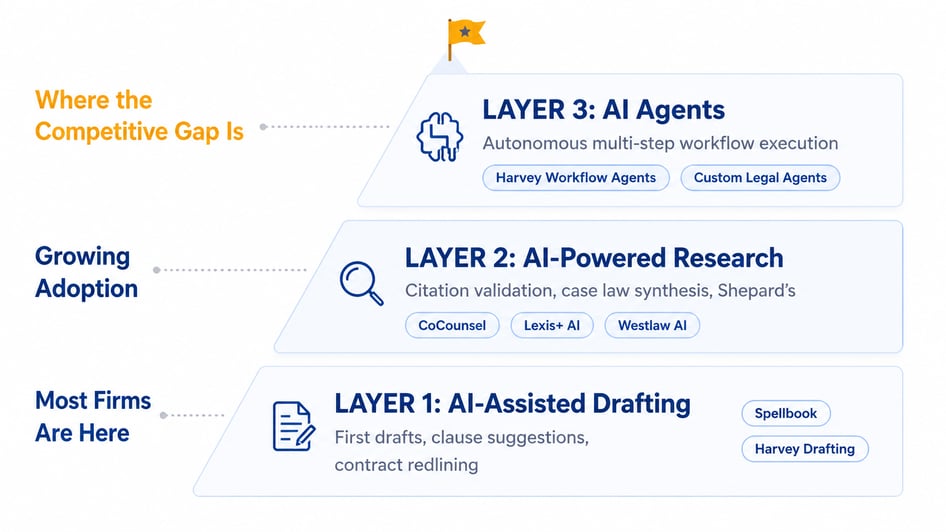 Before evaluating any tool, you need to understand one thing: AI software for law firms operates across three distinct layers, each with a different scope and a different ROI profile. Buying a Layer 1 tool and expecting Layer 3 results is how most implementations fail before they start.
|
Most firms today are at Layer 1. A handful are experimenting with Layer 2. Layer 3 is where the real competitive gap is opening, and it's still largely unoccupied territory.
The reason more firms aren't there isn't cost. Layer 3 requires a workflow decision, not a software decision. That's a harder internal conversation, and most firms keep deferring it.
Which Generative AI Tools Are Law Firms Actually Using in 2026?
There's no shortage of AI tools claiming to solve legal work. The honest answer is that each one is built for a specific type of practice, and deploying the wrong tool for the wrong workflow creates friction, not efficiency. Here's how the major platforms actually stack up:
| Tool | Best For | Key Technical Differentiator | Key Limitation |
|
Harvey |
Am Law 100 firms, large in-house legal departments | Vault for bulk document analysis; 2025 workflow agent deployment with A&O Shearman | Requires significant configuration and governance infrastructure |
| CoCounsel (Thomson Reuters) | Litigation prep and regulatory compliance | Multi-model LLM (Anthropic, OpenAI, Google) with Westlaw and Shepard's integration | Less suited for transactional drafting workflows |
| Spellbook | High-volume transactional contract work | Learns from firm's existing templates; operates inside Microsoft Word | Not a research tool; no litigation application |
| Clio Manage AI | Matter administration and practice management | Deadline extraction, invoice generation, matter file organization | Operational only, no substantive legal work assistance |
| Lexis+ AI | Litigation prep and jurisdiction-specific research | Conversational search with real-time case law and Shepard's validation | Weaker on complex multi-framework transactional analysis |
And across all five tools: none of them share a native data layer.
If your firm is running three of these platforms, your lawyers are copying and pasting between disconnected systems. That manual bridging process eliminates a significant portion of the time savings you purchased these tools to create.
AI Agents vs. AI Tools: What Law Firms Need to Understand Before Deploying
Let's clear something up first. The term "AI agent" is being applied to nearly everything right now, including basic document summarizers. That's not what we're talking about here.
A genuine AI agent does five specific things:
- Perceives the current state of a task or environment
- Generates a plan to complete it across multiple discrete steps
- Executes actions across tools and external systems via API calls
- Evaluates intermediate outputs and adjusts the plan if something changes
- Routes to human review when it hits a decision outside its defined authority
What separates an agent from an AI assistant is autonomous planning and cross-system execution. An assistant waits for your prompt and responds. An agent initiates, sequences, and acts.
The Technical Architecture Behind Legal AI Agents
The underlying execution structure is typically a directed acyclic graph (DAG) of task nodes. Each node is a discrete action: a database query, an API call, a document generation step, a write to a system record. Outputs from one node become inputs for the next. Branching logic handles conditional states. If a conflict is flagged at node two, the workflow routes to partner review rather than continuing to document generation.
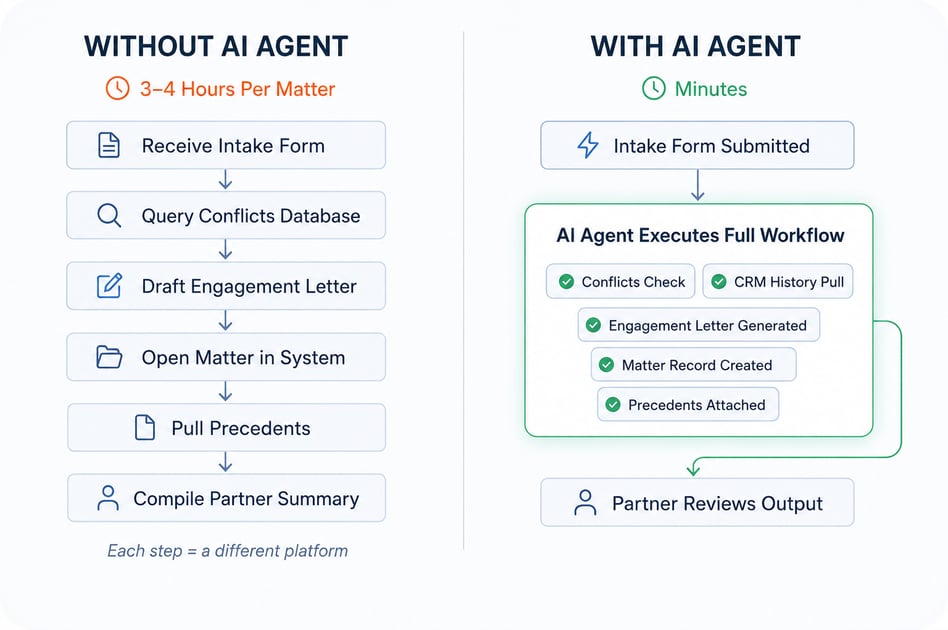
Before and After: What This Looks Like in Real Matter Intake
Here's what an AI agent changes for a mid-size litigation firm handling new matter intake:
Without an AI agent: Your associate receives the intake form, manually queries the conflicts database, drafts the engagement letter from a saved Word template, opens the matter in the practice management system, pulls relevant precedents, and compiles a summary for the supervising partner. Each step is a different platform. Total time: three to four hours per matter.
With a configured AI agent: The completed intake form triggers the entire workflow. The agent queries the conflicts database via API, retrieves client history from your CRM, generates the engagement letter using firm-approved templates, creates the matter record in the practice management platform, attaches relevant precedents, and routes the complete package to the partner's review queue with a flagged summary. Your attorney reviews the output. Total time: minutes.
A&O Shearman's deployment of Harvey workflow agents is the most credible production example of this architecture in mainstream legal practice. It's not experimental anymore
Where AI Tools for Law Firms Are Delivering Documented Results
82% of legal professionals using AI report measurable efficiency increases. But the aggregate number isn't where you should be looking. Here's what the gains actually look like at the workflow level:
| Use Case | Documented Gain |
| Standard contract review: NDAs, service agreements, commercial leases | Up to 65% reduction in first-pass review time |
| Legal research and case law retrieval | 4 to 6-hour tasks completed in under 30 minutes |
| M&A and real estate due diligence | Clause anomaly detection across thousands of documents in hours, not weeks |
| Per-matter administrative overhead | Measurable reduction via automated deadline extraction, invoicing, and file organization |
There are two limitations worth naming plainly before you build a business case around these numbers. The contract review gains concentration at the high-volume, lower-complexity end of your portfolio: standard NDAs, service agreements, and commercial leases.
Complex bespoke agreements between sophisticated parties still need senior attorney judgment. AI handles the repetitive end, not the strategic end.
And ROI from AI tools is largely a function of implementation quality. Firms that dropped a tool into an existing workflow without redesigning it haven't seen these numbers. The tool doesn't produce the gain, but the workflow redesign does.
Why AI Implementations in Law Firms Fail And How to Avoid It
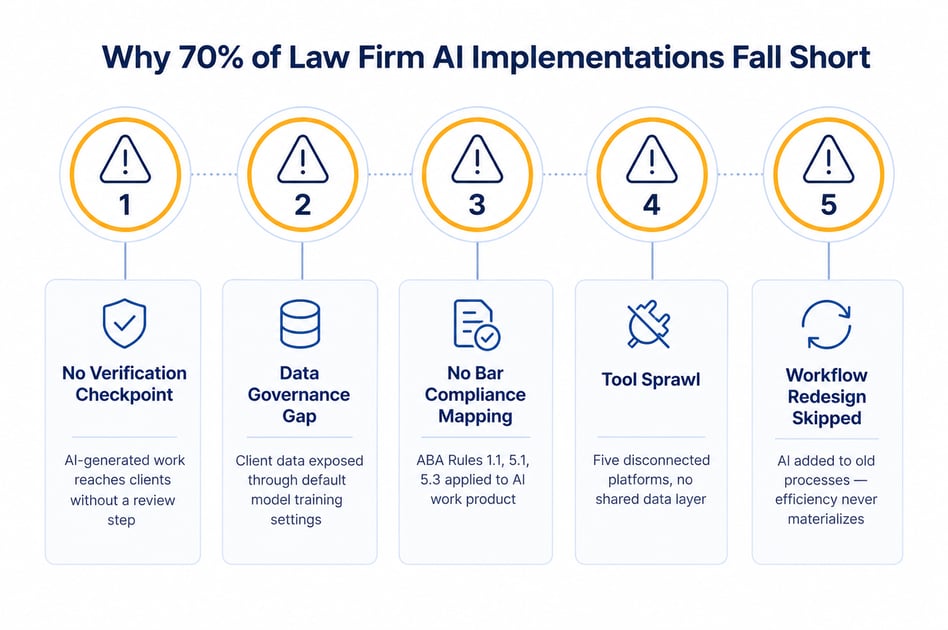
Only 30% of law firms report measurable productivity gains from AI adoption. The other 70% are in early-stage deployment or have hit one of these five failure modes. The technology is rarely the primary cause.
1. No Verification Checkpoint Before Work Leaves the Office
AI tools fabricate citations. Legal-specific platforms with Shepard's integration reduce this risk significantly. They don't eliminate it and the real failure is that firms haven't built a mandatory verification step into the workflow before AI-generated work product reaches a client. That step has to be a process requirement. Relying on individual attorney diligence is not a policy.
2. Data Governance Handled After Purchase, Not Before
Several commercial AI tools use inputted data for model training by default. Firms that skipped the data handling audit before deployment have already exposed client information in ways that may not yet be visible. Bar associations across multiple U.S. states issued formal guidance on this in 2024 and 2025 in response to documented incidents, not as a hypothetical warning.
3. No Bar Compliance Mapping
ABA Model Rules 1.1, 5.1, 5.3, and 3.3 apply directly to AI-generated work products. Most firms haven't formally mapped their current AI tool use against these rules for their specific jurisdiction. That mapping isn't a formality. It's the documentation that protects your firm when the question gets raised by a client or opposing counsel.
4. Tool Sprawl Without an Integration Architecture
Running multiple AI tools with no shared data layer creates more coordination work, not less. Your attorneys manually copy outputs between systems. Error rates climb. Time savings shrink. The integration question has to be part of your tool selection conversation, not a problem to solve after go-live.
5. The Workflow Redesign Never Happens
This is the deepest failure and the most common. AI at the drafting layer produces modest gains. The real gains come from redesigning how work moves through a full matter lifecycle, and that requires senior partner involvement in decisions most senior partners haven't historically needed to make. Firms that treat AI adoption as an IT initiative permanently stall at Layer 1.
How to Build an AI-Ready Law Firm: A Practical Starting Framework
The firms reporting real ROI from AI didn't start with a software shortlist. They started with a workflow audit, followed by the tool. Here's the framework that gets results:
Step 1: Audit at the Matter Level, Not the Task Level
Map where your attorney and staff time goes across a complete matter lifecycle, from initial inquiry to final invoice. Not "we draft a lot of contracts" but every step: conflict check, engagement letter, matter setup, research, drafting rounds, client update cycles, billing entries, and file closure.
The AI surface area becomes visible at the workflow level. It almost never becomes visible when you examine individual tasks in isolation. This is the step most firms skip, and it's why most implementations underdeliver.
Step 2: Pilot on One Practice Group, One Specific Workflow
Pick the practice group handling the highest volume of repetitive document work. Define one specific workflow to test: new matter intake, standard contract review, or deposition summary preparation. Run ninety days and measure time-per-matter, not satisfaction scores.
Step 3: Redesign the Workflow Before Scaling the Tool
Firms that skip this step add an AI tool to an existing process and wait for efficiency to appear, which doesn't. The firms with measurable results asked a different question first: what does this process look like when AI handles its defined portion? Then they built the attorney's role around what remains.
How Signity Helps Law Firms Implement AI That Actually Works
We have worked with more than 20 U.S. legal teams over 16 years, from regional boutique practices to multi-office firms with complex practice portfolios.
Our clients have reduced standard document review cycles by an average of 55%, and new matter setup time has dropped from 3.8 hours to under 50 minutes in firms that redesigned intake workflows alongside the AI deployment. For a closer look, read the Counsel AI case study.
Here's what makes the approach different:
Full Implementation Cycle, Not Just Software Delivery
The work covers workflow audit, tool selection, integration architecture, data security configuration, and bar compliance mapping. Most vendors hand over a tool. Signity redesigns the workflow around it.
Bar Compliance Built Into the Build
Every implementation is mapped against ABA Model Rules 1.1, 5.1, and 5.3 for your specific jurisdiction. That mapping happens at the start, not after something goes wrong.
Secure by Design
Data security architecture and attorney data governance configuration are part of the deployment from day one, not a post-launch checkbox.
Move Beyond Layer 1
For firms ready to automate multi-step legal workflows, we build and deploy custom AI agents across your existing systems, with defined escalation paths and attorney oversight built in.
Experience Across Every Firm Size
From boutique practices to multi-office operations, the AI consulting and implementation framework adapts to your firm's scale, practice mix, and existing infrastructure. If your firm is planning to implement AI for legal services, start with a workflow audit.
Frequently Asked Questions
Have a question in mind? We are here to answer. If you don’t see your question here, drop us a line at our contact page.
What does AI specifically do for law firms?

AI for law firms automates contract review, legal research, client intake, conflict checking, and billing, cutting non-judgment work so attorneys focus on strategy and counsel.
How is an AI agent different from a legal AI assistant?
An AI agent for law firms executes multi-step workflows autonomously across systems. A legal AI assistant only responds to individual prompts and waits for your next instruction.
Is generative AI safe for confidential legal client data?
Generative AI for law firms is safe when deployed on private cloud with no training-data sharing. Audit data handling configuration before purchase, not after go-live.
Can small law firms use AI software cost-effectively?
Yes. AI software for law firms like Clio Manage AI and Spellbook offers pricing tiers suited to small practices. Implementation complexity, not cost, is the primary barrier.