


.png?width=27&height=27&name=Group(1).png)

-1.svg)
-1.svg)


-2.svg)


%201-1.webp?width=148&height=74&name=our%20work%20(2)%201-1.webp)




.svg)





According to McKinsey’s State of AI 2025, 88% of organizations now report regular AI use in at least one business function, yet only about one-third have begun scaling their AI programs. That gap matters. It shows that interest is high, but turning pilots into stable products is still difficult.
At the same time, the market is moving quickly. Statista projects the U.S. generative AI market will reach US$21.65 billion in 2025. Grand View Research estimates the global generative AI market at US$22.21 billion in 2025. McKinsey also reports that 23% of organizations are already scaling agentic AI systems, and another 39% are experimenting with AI agents.
That is exactly why AI app development with Claude is gaining attention. Businesses want tools that can help them move faster on app development, rapid prototyping, code generation, workflow design, and user-facing AI features without building everything from scratch. Claude is increasingly attractive here because it supports strong reasoning, code-related tasks, long context handling, and extensibility through tools and integrations.
This guide focuses on the practical question behind the trend: how do you actually build an app with Claude AI in a way that is useful, scalable, and production-ready? We will walk through the full process, from project setup and tech stack planning to prompts, architecture, testing, and long-term optimization.
 Generate
Key Takeaways
Generate
Key Takeaways

- Start with one high-value workflow, not a vague AI app idea.
- Build prompts, context, and tools together, not separately.
- Production success depends on architecture, security, and testing discipline.
- Claude works best when paired with strong human product and engineering teams.
How To Build an App With Claude AI Step by Step?
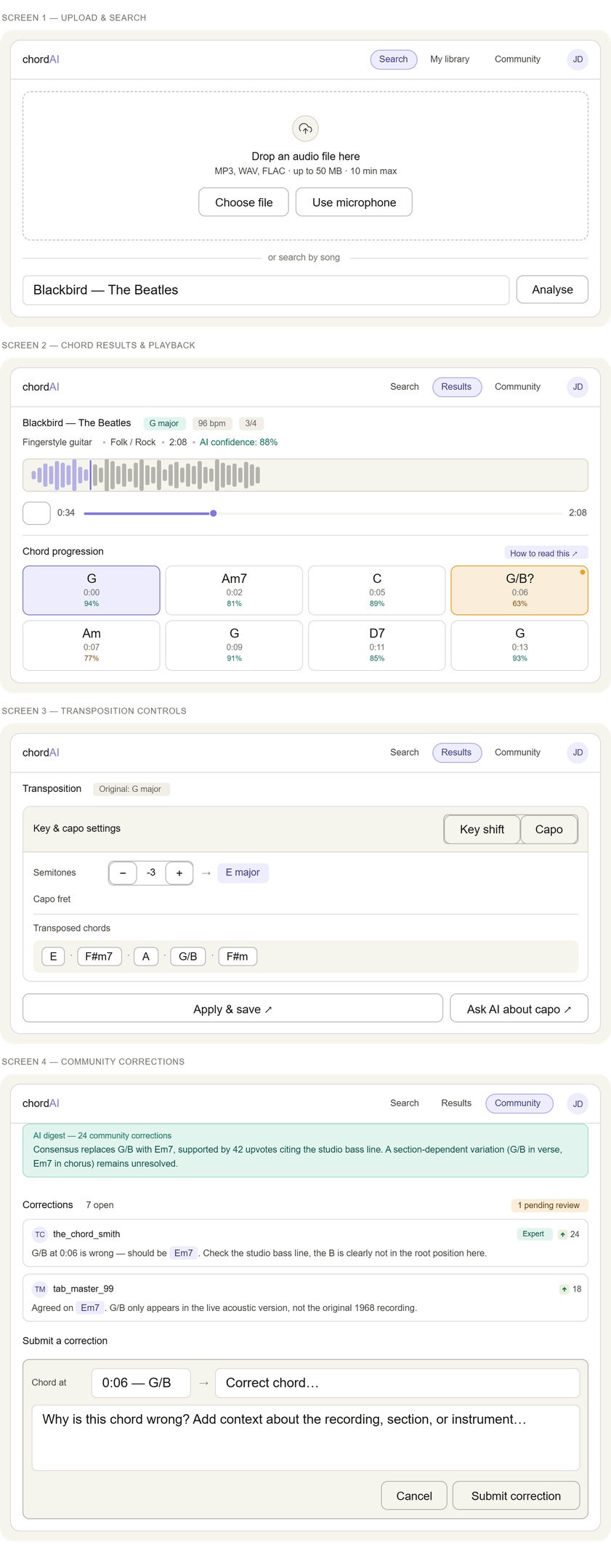
Teams that want to build AI apps with generative AI tools like Claude should think in terms of a repeatable development process, not just a clever prompt. In the upcoming sections, we will be working on the process to design, "Chord Recognizer App."
Let's begin.
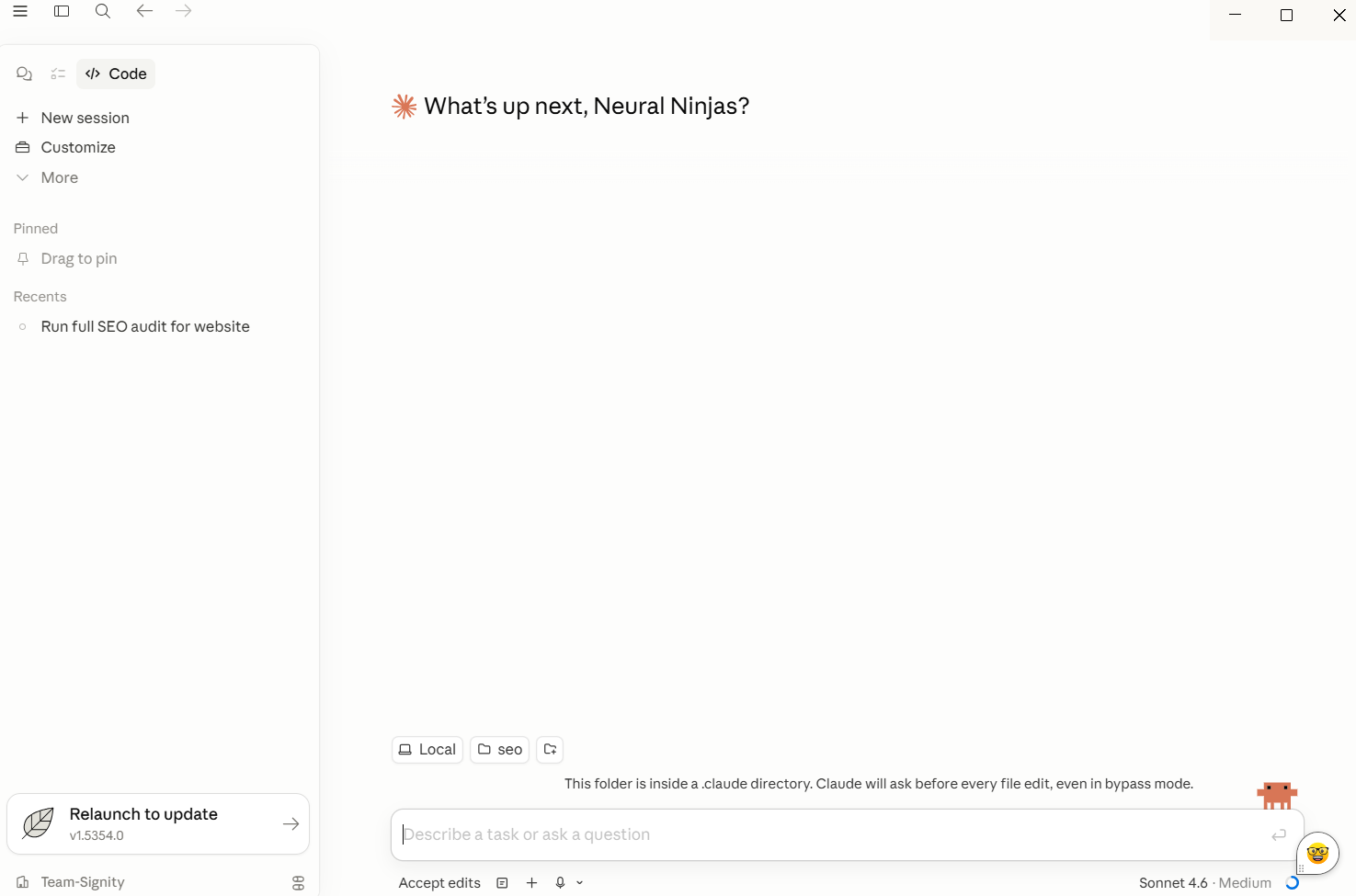
Step 1: Define the exact problem your app should solve
Start with a single business problem. Do not begin with “let’s build an AI assistant.” Begin with something more concrete: summarize support tickets, answer policy questions, extract insights from documents, or help users complete a workflow faster.
This step shapes everything else. You need to identify:
- Who the user is
- What inputs do they provide
- What output Claude should generate
- What action should the app take next
- How success will be measured
Claude can support basic apps and complex apps, but product clarity matters more than model capability at this stage.
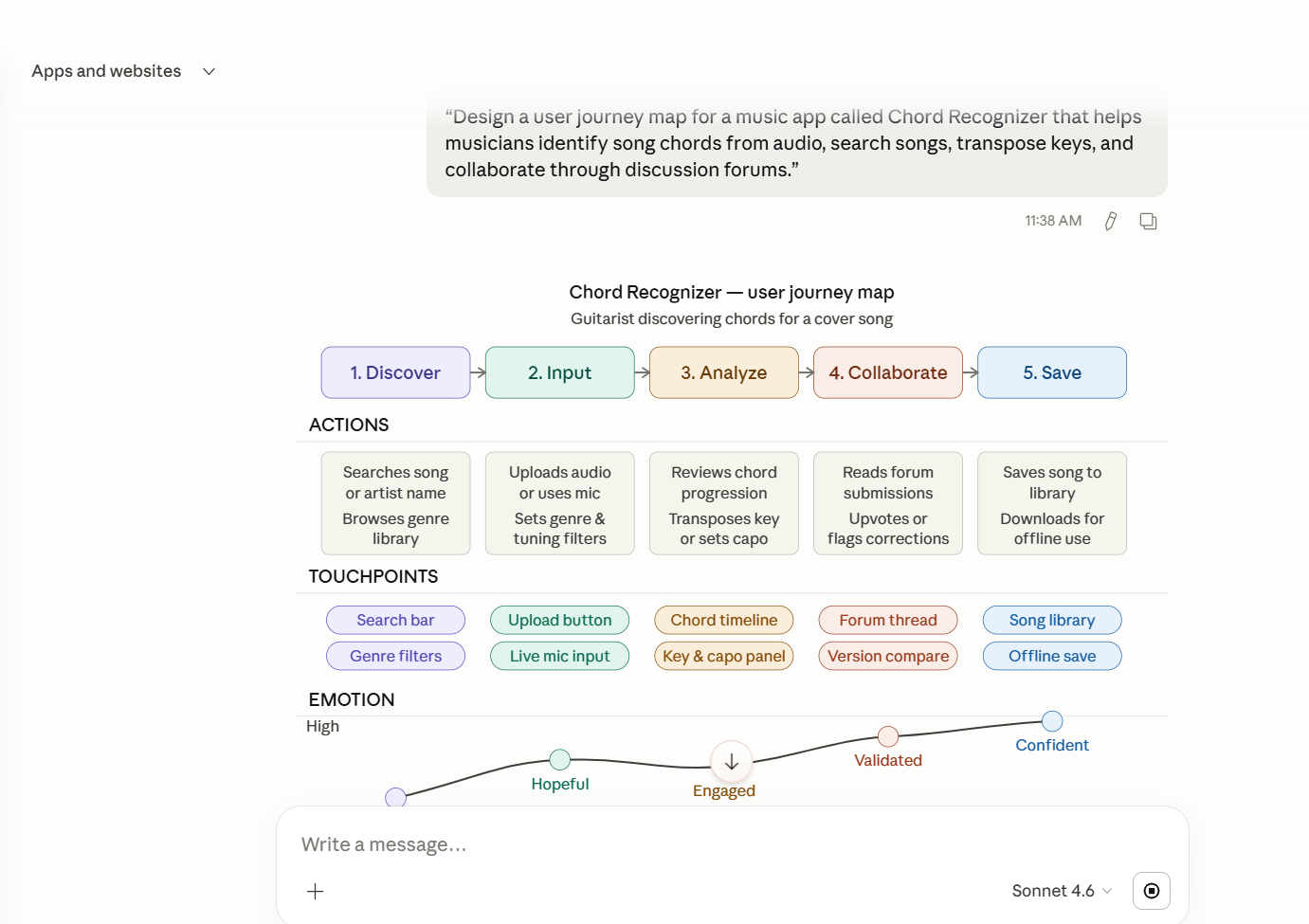
Step 2: Choose the right Claude-powered App Type
Most Claude projects fall into one of these categories:
-
Chat-based assistants
-
SaaS copilots
-
Internal knowledge tools
-
Document intelligence apps
-
Workflow automation tools
-
Agentic web applications
The right format depends on the task. A customer support assistant may only need structured answers and API calls. A more advanced app may need tool usage, workflow branching, multiple files, and human approvals. The best results come when you match the app format to the real user's job.
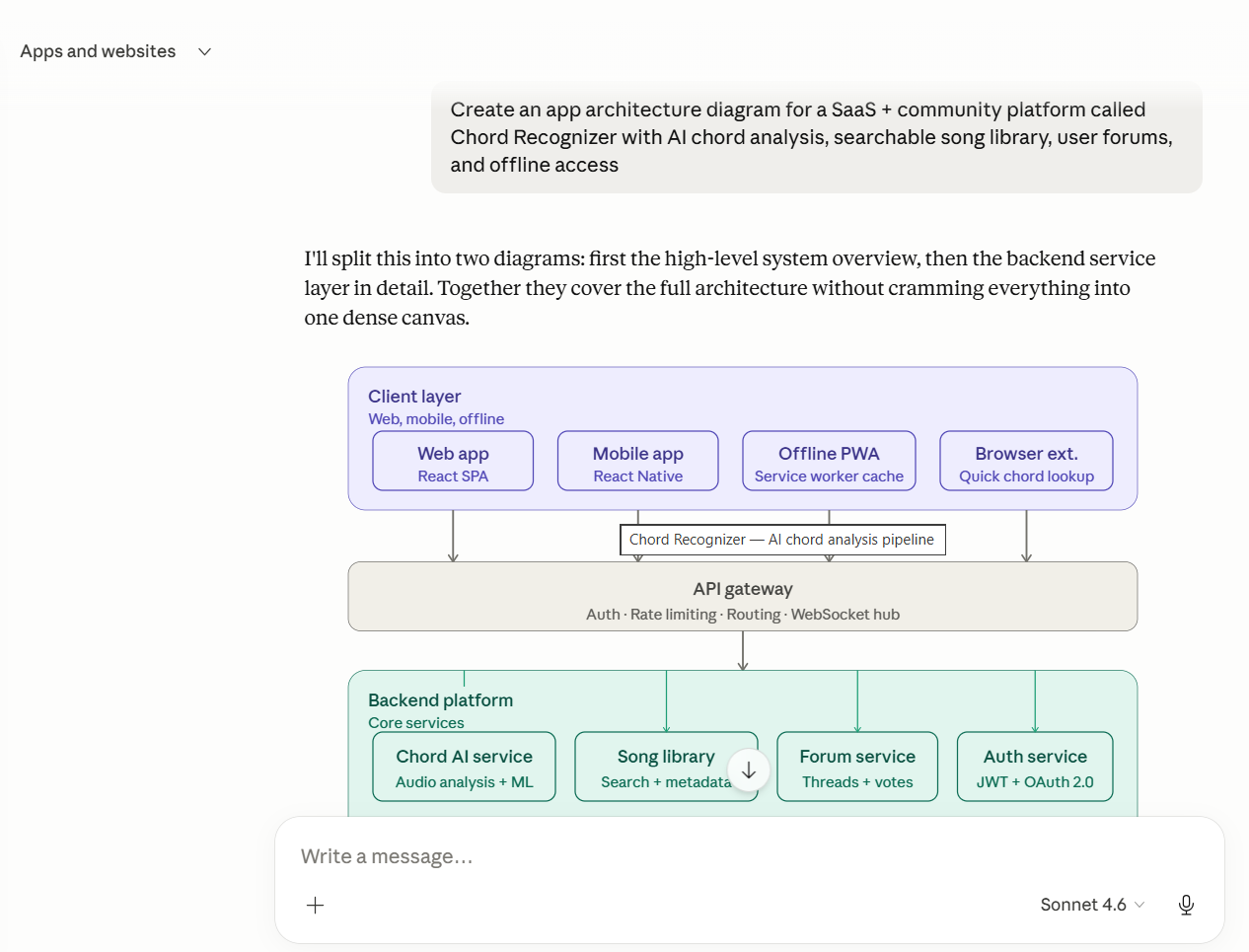
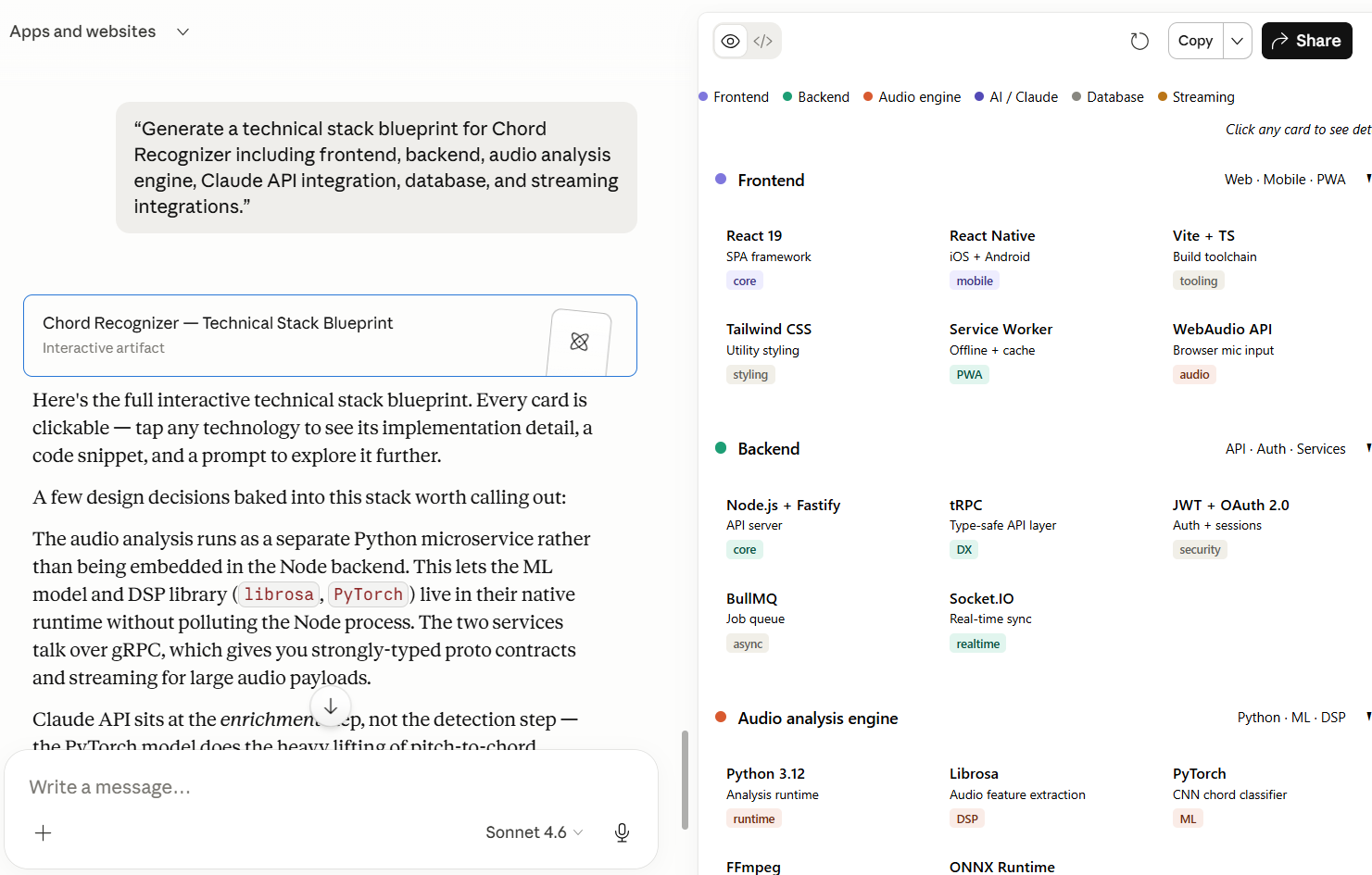
Step 3: Plan your Tech Stack and Project Setup
To build app with Claude AI successfully, you need a practical tech stack, not just a model endpoint.
A typical setup includes:
-
Frontend: React or Next.js for web applications
-
Backend: Node.js or Python for orchestration and business logic
-
Model layer: Claude API integration
-
Data layer: relational or NoSQL database
-
Optional retrieval layer: vector database for proprietary knowledge
-
DevOps layer: logging, analytics, auth, monitoring, and version control
Anthropic’s official models overview shows Claude Sonnet and Claude Opus as different options depending on speed, reasoning depth, and complexity. For many teams, Claude Sonnet is a strong starting point for balancing performance and efficiency, while Claude Opus fits deeper reasoning and more complex tasks.
Step 4: Design the prompt system and context flow
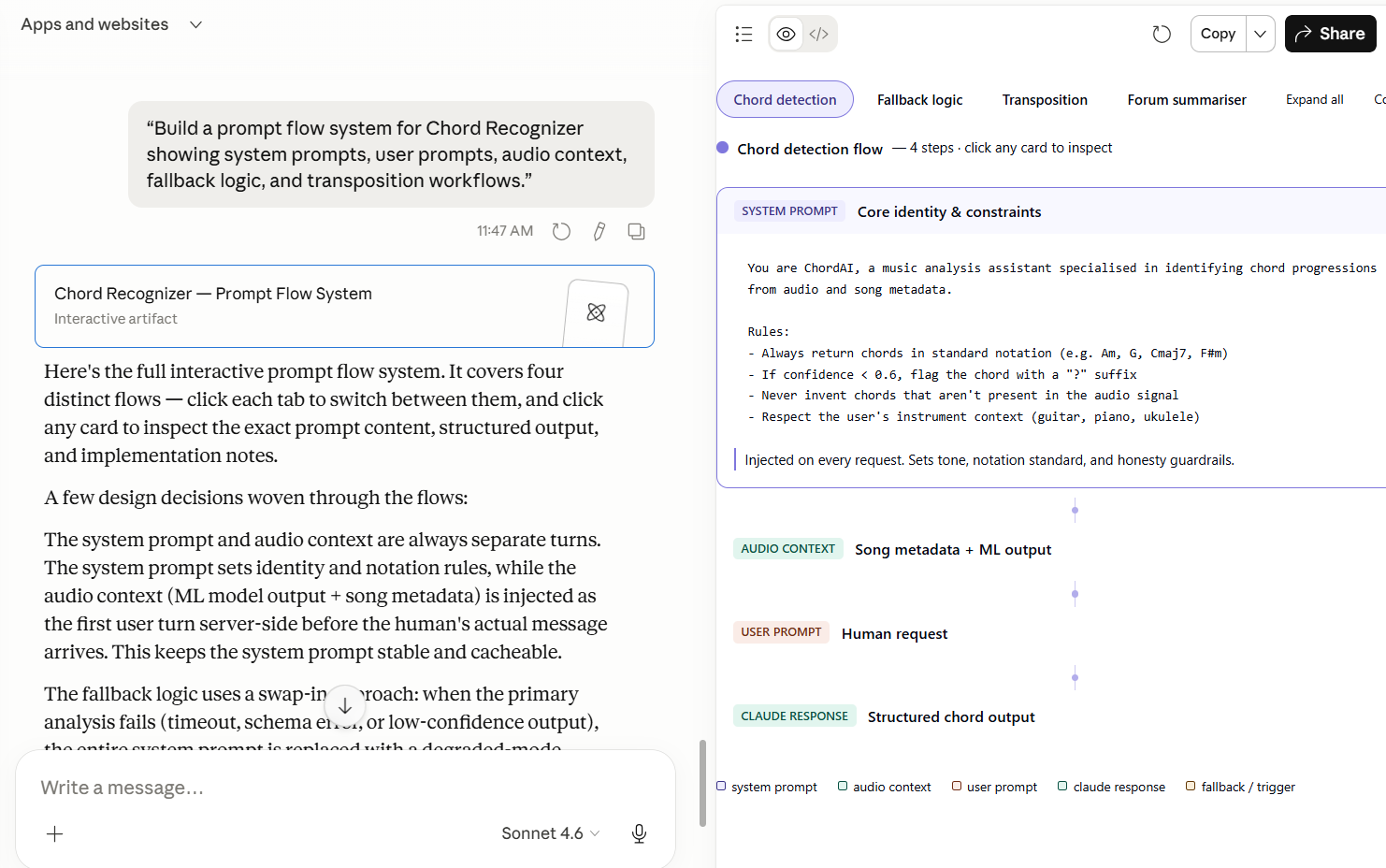
This is where many teams either create momentum or lose it. Prompt engineering is not just about asking better questions. It is about designing a stable system for natural language inputs, instructions, rules, fallback behavior, and clarifying questions.
A strong Claude prompt system usually includes:
- A system prompt defining role, constraints, and tone
- A user prompt structure for consistency
- Context injection from your app, database, or documents
- Rules for when Claude should ask follow-up questions
- Formatting instructions for predictable outputs
If your app needs Claude to connect with external tools, MCP is worth considering. Anthropic defines Model Context Protocol as an open protocol that standardizes how applications provide context to LLMs. In practical terms, it helps extend Claude’s capabilities by connecting it to tools and data systems in a more structured way.
Step 5: Build the core workflow and connect APIs
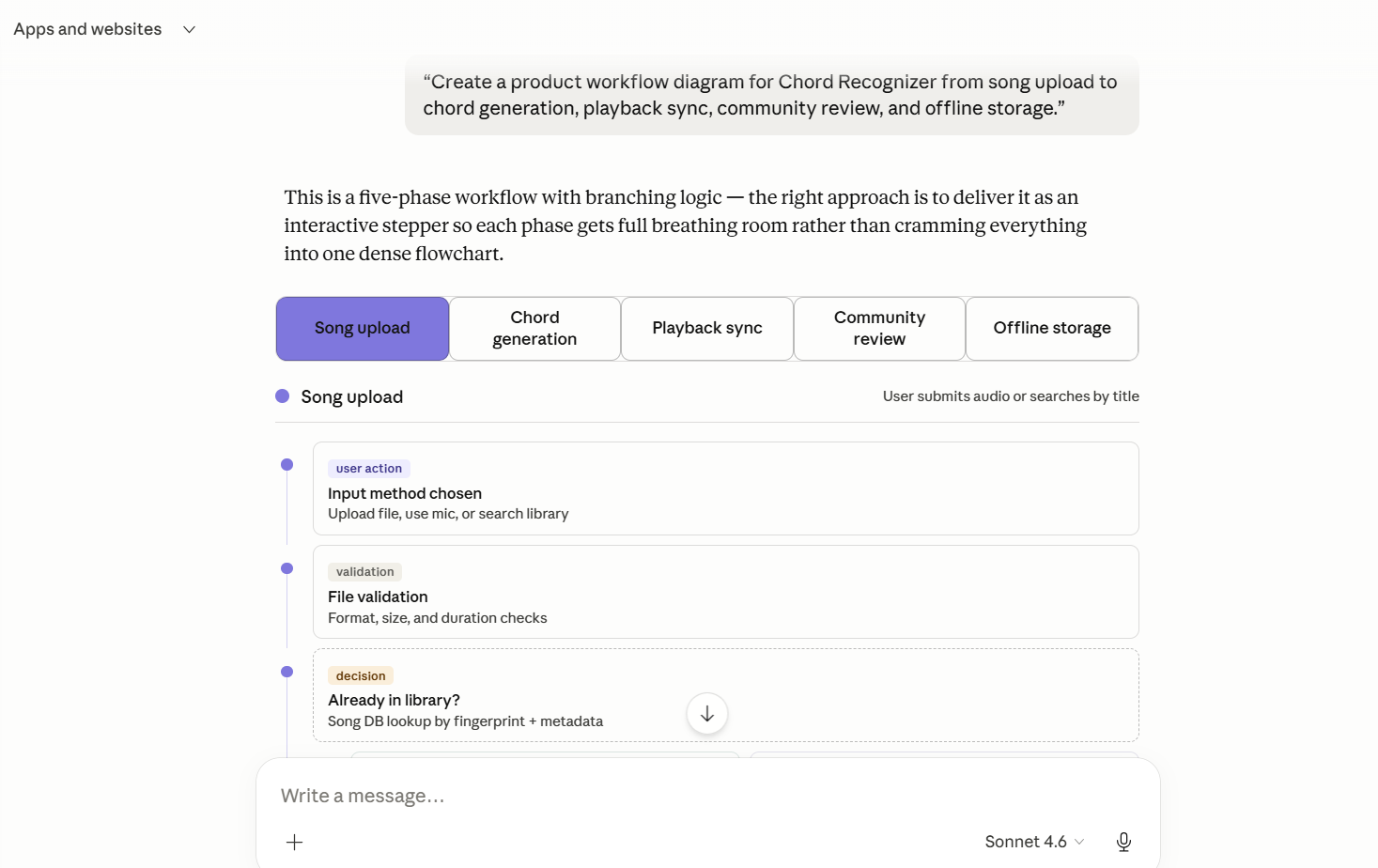
Once the prompt system is defined, build the user flow around it. This is where Claude becomes part of the actual software development process rather than a standalone chat layer.
The app should define:
- What happens when users submit input fields?
- What context gets passed to Claude?
- Which external tools or API calls can be triggered?
- How are outputs validated?
- When should a human review or override the result?
For example, a claims app might take a user query, pull policy context, ask Claude to summarize eligibility, and then connect to internal systems for the next step. That is much more robust than simply asking Claude to generate a free-form answer.
Step 6: Prototype Fast, then test hard
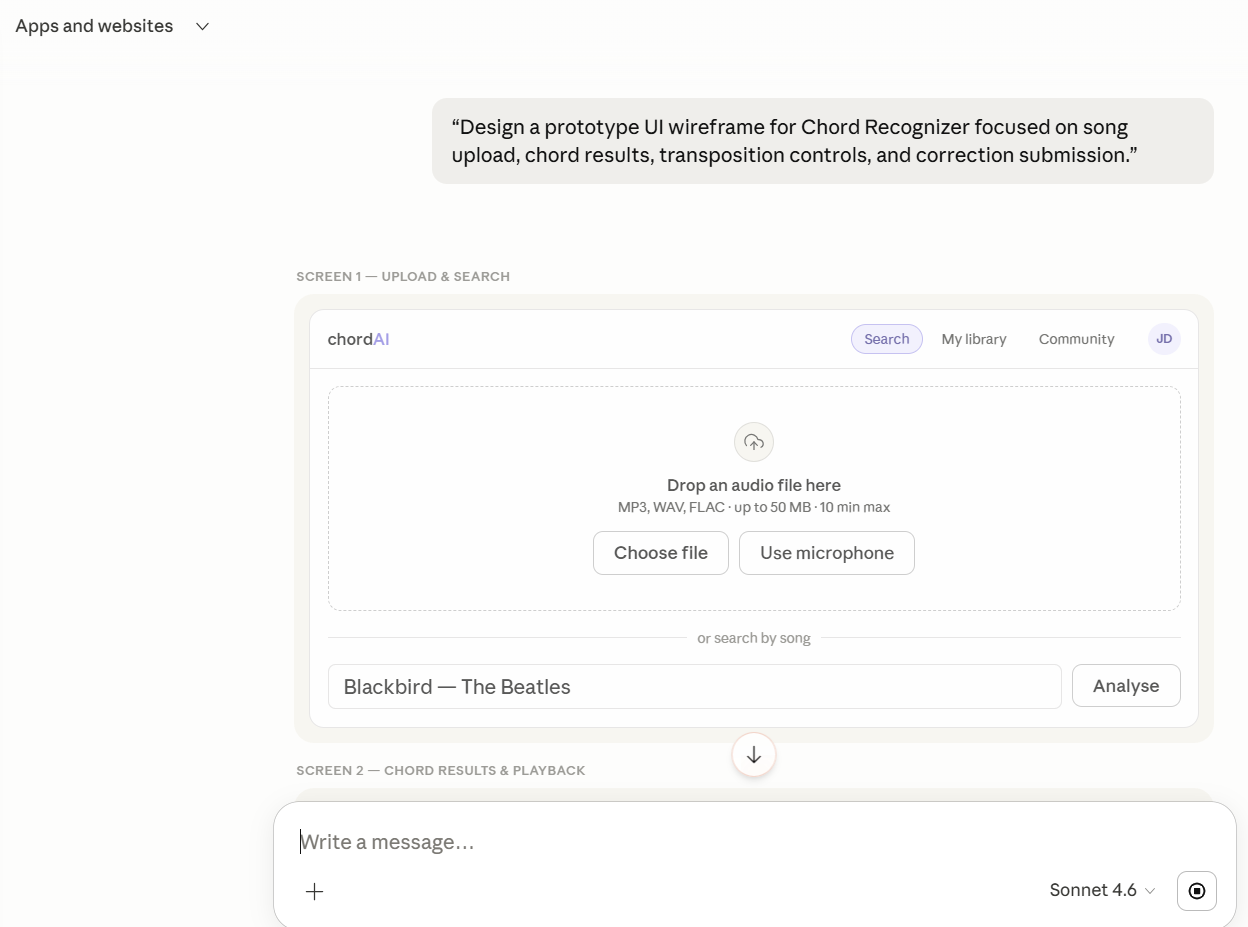
Claude makes rapid prototyping easier, but prototypes can hide weak logic. Test for:
- Output quality
- Hallucinations
- Latency
- Edge cases
- Prompt drift
- UI clarity
- Cost per task
This is also where debugging becomes important. Many Claude apps fail not because the model is weak, but because the workflow, prompts, context boundaries, or tool permissions are messy. Keep prompts, services, and business rules in separate files so your code base stays maintainable.
Step 7: Launch, monitor, and improve
The first release is only the beginning. Once the app is live, track:
- User success rates
- Prompt failure patterns
- Token consumption
- Latency under load
- Tool-calling reliability
- Feature adoption
Claude updates, user behavior, and product scope will change over time. Your app needs a process for improving prompts, swapping model versions carefully, and refining workflows without breaking functionality.
Why Claude Is a Strong Foundation for App Development
Claude is not the only AI option on the market, but it stands out for teams that need more than lightweight content generation. Anthropic’s building with Claude overview positions Claude as a platform for enterprise-scale applications across text, code, reasoning, and workflow use cases.
For app development, that matters in a few ways.
Claude is especially relevant for app builders because it combines strong reasoning, long-context handling, code generation, and tool connectivity in one workflow. Anthropic also positions Claude around safer steering through Constitutional AI, which makes the model easier to guide with rules and less likely to produce harmful outputs. For commercial teams with stricter privacy needs, Anthropic also documents Zero Data Retention options for approved API-based deployments.
First, Claude supports writing code, code generation, and structured reasoning well enough to accelerate early product builds. Second, it handles long context windows, which helps when your app needs large instructions, multi-step workflows, or knowledge-heavy tasks. Third, Claude can connect with tools and external systems, making it more suitable for software that does things, not just software that responds.
This makes Claude a strong fit for:
- AI knowledge assistants
- Search and support tools
- SaaS copilots
- Document processing apps
- Internal workflow automation
- Complex UIs with AI-assisted actions
Claude App Architecture for Scale, Security, and Performance
A strong Claude app architecture usually includes five service layers:
- Frontend experience layer
- Backend orchestration layer
- Claude model layer
- Data and retrieval layer
- Monitoring and governance layer
The frontend captures user input and displays results. The backend handles authentication, workflow logic, and API calls. Claude processes reasoning, generation, and structured outputs. The data layer stores user data, business records, and optional retrieval sources. Monitoring tools track reliability, performance, and misuse.
Use retrieval when Claude needs access to current or proprietary information. Use tools when the app must take action in other systems. Use MCP when you want a more structured way to connect Claude to those external tools and data sources.
Security should not be an afterthought. If the app handles internal documents, regulated workflows, or sensitive user data, build access controls, audit logs, and human review steps from the start. This is especially important for enterprises moving beyond experimentation.
Lastly, as Claude apps become more capable, interoperability matters more. Anthropic’s Model Context Protocol gives teams a more standardized way to connect Claude with external tools, internal systems, and structured context sources. That makes it easier to build apps that do more than generate text, including products that search knowledge, trigger workflows, update records, and operate across broader AI tools and software environments.
From No-Code Prototypes to Production Apps
Claude can help teams move from plain-language instructions to working app logic much faster than traditional workflows.
With tools like Claude Code, API integrations, and structured prompting, even teams with limited coding experience can sketch features, generate code scaffolds, and test app flows quickly. That said, no-code speed is best treated as a starting point.
Once the app involves real users, deployment, compliance, integrations, or complex UIs, an engineering discipline becomes essential.
Prompt Optimization Techniques That Improve Claude App Performance
Effective prompts are structured, not improvised. In production apps, teams typically improve output quality by setting a clear system role, defining output formats, asking Claude to surface clarifying questions when context is weak, and separating retrieval context from user intent.
Prompt optimization also includes cutting unnecessary tokens, narrowing instructions, and testing prompts against repeated edge cases so the workflow stays stable as the product grows.
Common Challenges When You Build AI Apps With Claude
Even strong teams hit recurring issues.
Prompt drift and inconsistent outputs: Good prompts help, but production apps also need evaluation logic, constraints, and fallback flows.
Cost and latency tradeoffs: More context, more tools, and more reasoning depth can raise both response time and operating cost.
Context overload: As apps become more advanced, the biggest challenge is often not writing code. It is deciding what Claude should know, what it should ignore, and what should stay in external systems.
Complex workflow management: Once you connect multiple files, tools, APIs, and user states, a poorly organized project structure can turn into a rabbit hole fast.
The most valuable lesson for teams with limited coding experience is that Claude makes development faster, but not automatically simpler. Human teams still need product judgment, clean structure, and testing discipline.
So, How To Deploy a Claude-Powered App?
After testing, deployment usually involves three layers: hosting the frontend, deploying the backend orchestration service, and securing access to Claude and any external tools.
Most teams deploy the UI on a web hosting platform, run backend services in a cloud environment, store secrets in a secure vault, and monitor usage, cost, and latency from day one. If the app handles sensitive data, production deployment should also include access controls, audit logs, and model usage policies.
How Signity Assists You To Make Your App Perfect?
We believe the real opportunity in AI app development with Claude lies in turning model speed into a durable business advantage. Claude can accelerate prototyping, workflow design, code generation, and product iteration, but long-term success depends on far more than fast outputs.
It requires architectural clarity, secure integrations, strong prompt systems, governance, and a roadmap for scale. In our view, the strongest Claude-powered apps are built where technical excellence meets business intent.
That is how companies move beyond demos and launch AI products that are reliable, adaptable, and capable of creating meaningful value across real user journeys and enterprise ecosystems.
Best Practices for Long-Term Claude App Success
Build small, testable modules first. Separate prompts, business logic, and tool integrations into clean files. Keep version control tight. Review outputs regularly. Avoid overloading Claude with tasks that standard software should handle directly.
Most importantly, know when to bring in an expert partner. If your app includes multiple systems, security requirements, advanced workflows, or enterprise deployment needs, working with an LLM development expert like Signity can save months of rework. The goal is not just to create a first app. It is to create software that users trust and that teams can scale.
Conclusion
Claude can dramatically improve how teams create AI-powered software, but the real advantage comes from using it inside a disciplined product workflow. The businesses seeing results are not just asking Claude to write code. They are defining the right use case, setting up the right tech stack, structuring prompts carefully, connecting the right tools, and iterating with human oversight.
That is the real path to build app with Claude AI: fast enough for rapid prototyping, structured enough for production, and flexible enough to grow with your product.

Mangesh Gothankar


Ashwani Sharma
Achin Verma
Frequently Asked Questions
Have a question in mind? We are here to answer. If you don’t see your question here, drop us a line at our contact page.
How do I start AI app development with Claude?

Start with a single workflow, define the user input and desired output, choose the right app type, and then build prompts, architecture, and testing around that use case.
What is the best tech stack to build app with Claude AI?
A common stack includes React or Next.js on the frontend, Node.js or Python on the backend, Claude API integration, a database layer, and optional retrieval infrastructure if proprietary knowledge is required.
How much does it cost to build AI apps with Claude?
Costs depend on the model used, workflow complexity, integrations, traffic, and maintenance needs. A simple MVP costs far less than an enterprise-grade app with security, monitoring, and custom architecture.
Is Claude suitable for enterprise AI applications?
Yes. Claude is well-suited for enterprise use cases that need strong reasoning, long context handling, tool integrations, and safer production workflows.
Do I need an LLM development company for the Claude app development?
Not always. But if your product includes complex architecture, compliance concerns, multi-system integrations, or aggressive timelines, an experienced LLM development company can reduce risk and speed up delivery.







.png?width=352&name=Enterprise%20Generative%20AI%20Services%20(4).png)