


.png?width=27&height=27&name=Group(1).png)

-1.svg)
-1.svg)


-2.svg)


%201-1.webp?width=148&height=74&name=our%20work%20(2)%201-1.webp)




.svg)





Amazon uses AI agents to power Alexa's conversations. Google relies on them to deliver smarter search and personalized experiences. These AI agents are proof, already in use, that autonomous systems are changing the way businesses operate.
Gartner predicts that one-third of generative AI interactions will soon be driven by AI agents. The global AI agents market itself is projected to grow from $10.9 billion in 2026 to $182.9 billion by 2033, a 49.6% CAGR, according to Grand View Research. With adoption moving this fast, many business leaders are now asking the same question. How do they build an AI agent that brings the same level of efficiency and innovation to their own enterprise?
In this blog, we’ll break down what AI agents are, explore their use cases, and walk you through the steps of building one effectively for your business.
 Generate
Key Takeaways
Generate
Key Takeaways

-
AI agents are software that perform tasks automatically. They can handle everything from simple actions to complex activities, such as managing traffic and financial trades.
-
AI agents are more than just chatbots. They can analyze information, make decisions, and take actions without needing constant help from humans. This helps businesses save time and reduce manual work.
-
Having a clear purpose for your AI agents can ensure they make a real difference instead of just being another tech project.
-
Using clean, relevant, and well-organized data ensures that AI agents are accurate, reliable, and can improve over time.
-
Choosing the right technology foundation allows your AI agent to work smoothly with your systems, adapt to business growth, and avoid expensive redesigns later.
What are AI Agents?
An AI agent is a software program powered by artificial intelligence. It reaches specific goals, usually with minimal human involvement. These agents take in information about their surroundings and use it to make decisions.
From there, they act on those decisions to complete a task, whether that task is simple or fairly involved. What sets them apart from ordinary software is the ability to learn from experience and adapt without someone rewriting the rules each time.
In the future, people might interact with Generative AI (GenAI) differently. Instead of just giving prompts to large language models (LLMs), they could directly work with intelligent agents that understand what they want. This change could give these agents more independence and better help people achieve their goals. - Arun Chandrasekaran, VP analyst at Gartner
What are the Key Components of AI Agents?
AI agents can vary in complexity, ranging from simple chatbots to advanced autonomous systems. Understanding these components is essential to building an AI agent that is goal-focused. However, autonomous agents share common key components: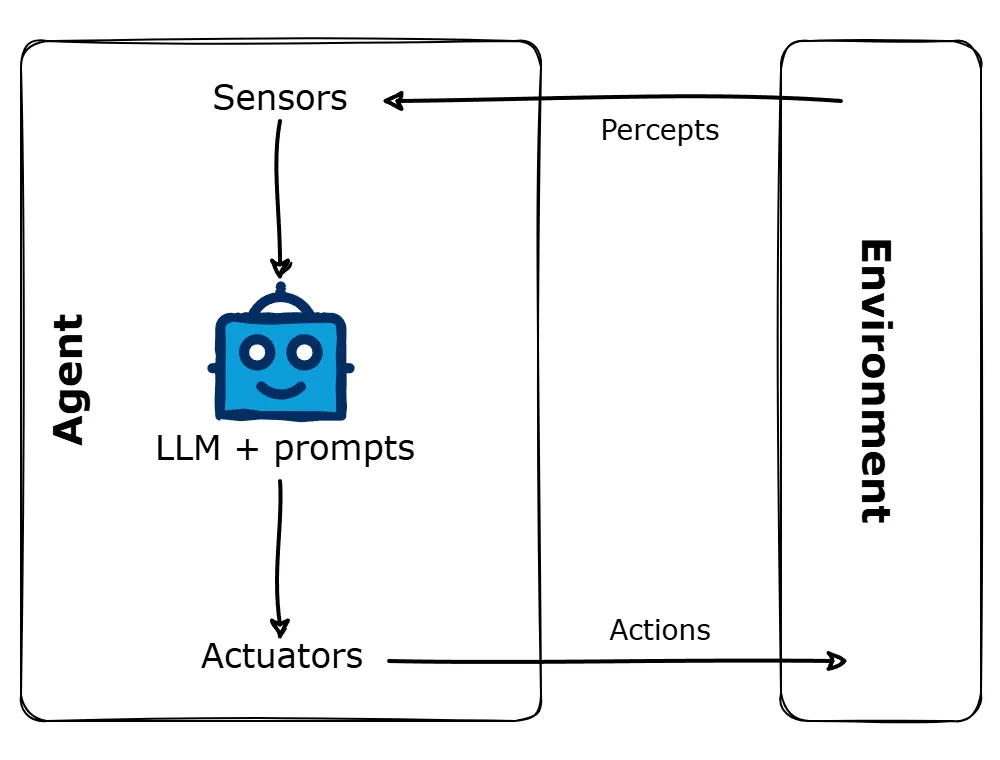
1. Perception
AI agents gather data through sensors, APIs, or user input. They process that data to pull out useful insights. This lets them read their environment and respond in a way that actually fits it.
2. Processing & Reasoning
The agent analyzes data with algorithms and decision-making machine learning models to determine the best action based on logic, predictions, or rules.
3. Memory & Learning
AI agents improve by learning from past experience. Machine learning techniques sharpen their accuracy over time. The same techniques improve efficiency and adaptability as well.
4. Action Execution
Once the agent processes information, it acts according to its goals. It may involve answering questions, automating tasks, or controlling devices.
Understanding these components is essential for building an AI agent. Now, let us move forward to understand the process of creating an AI agent.
Types of AI Agents You Can Build
Before building one, it helps to know what kind of agent is actually needed. Not every use case calls for the same design. Picking the wrong type early on is one of the most common reasons AI agent projects stall before launch.
- Specialized agents: Built to do one job extremely well, such as classifying support tickets or checking order status. They are cheaper to run than agents that try to do everything. They are also easier to test and faster to ship.
- Task agents: Automate a specific action or a repeatable workflow, such as generating a report or updating a CRM record. Once the task is complete, they hand control back to a person.
- Autonomous agents: Work independently toward a goal. They decide on a specific action at each step. They adjust their plan as new information comes in.
- Multi-agent systems: One agent rarely handles a task end-to-end here. Instead, many agents each take on a narrow role. They coordinate through a multi-agent framework. This handles workflows with multiple steps and different specialties, like research, drafting, and review.
Most businesses get the best results by starting small. They begin with a single specialized agent and prove its value first. Only then do they expand into a system where many agents work together. Multi-agent frameworks get covered in more detail later in this guide.
How to Create an AI Agent?
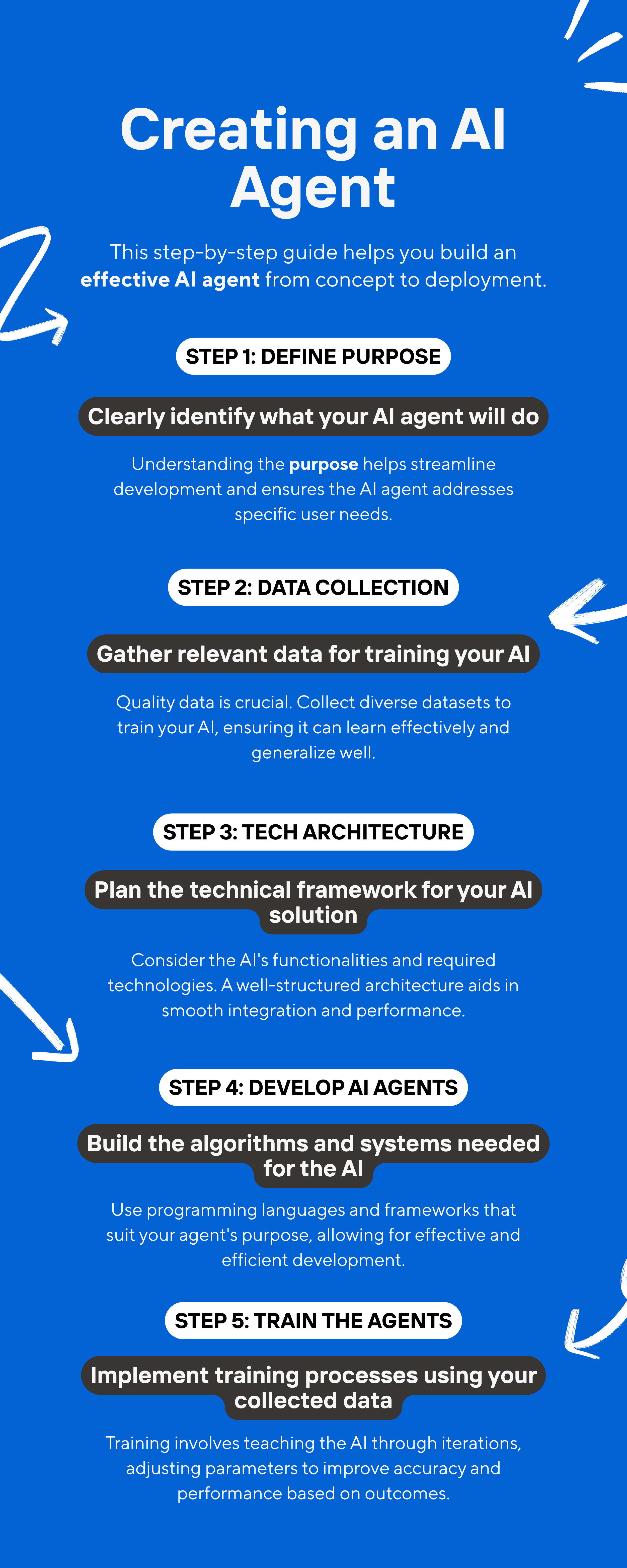
Creating an autonomous agent in business requires a step-by-step approach to ensure that the technology integrates seamlessly while meeting the organizational goals.
Build Your First AI Agent in Minutes (No-Code Quick Start)
Before committing to a full technical build, an AI agent can be created in under ten minutes using a no-code platform. This is a fast way to test an idea. It shows exactly how to make an AI agent respond before a single line of code gets written.
- Create a new account on a no-code agent builder, such as OpenAI's AgentKit, Microsoft Copilot Studio, or Salesforce Agentforce. Most offer a free tier, which is enough to build and test your first agent.
- Describe the agent’s job in plain language. This is your sample prompt. For example: “You are a scheduling assistant. When someone asks for a meeting, check the calendar, suggest three open times, and send a confirmation email once they pick one.
- Type your prompt and press Enter. The platform generates a working draft of the agent, along with the tools it thinks it will need.
- Connect the tools it should use, such as a calendar, email, or a knowledge base. The connectivity can enable the agent to execute tasks instead of only describing them.
- Test it with a real question, then view the image or transcript of the run to confirm it did what you expected.
Pro Tip 💡 - This quick version is a prototype, not a production system. Use it to validate your idea and refine your sample prompt before you write any code or hand the project to a developer.
Define the Purpose and Goal Clearly
The first step of building an intelligent agent is simple. What exactly is it going to do? Begin by outlining the purpose of developing an AI agent. There could be numerous real-world applications for using AI agents. However, the basic requirement is to identify the purpose of building it.
Pro Tip💡- We always recommend starting with a single and well-defined use case. It's tempting to build a "do-everything" agent. But focused agents deliver better ROI and faster time-to-value.
Training Data Collection
Before moving to building agents, the technical landscape needs an assessment first. An AI agent's ability to process user inputs and generate human-like responses depends heavily on the quality and diversity of the data it learns from. This means gathering large datasets. These datasets should include historical data, real-time user interactions, relevant information, user queries, and feedback.
So, building an effective AI agent starts with gathering relevant data from diverse sources. This means pulling from databases, APIs, user interactions, local files, cloud storage, or enterprise systems, to get comprehensive coverage. A chatbot project, for instance, needs past chat logs and customer queries as a starting point.
Here is how we do it the right way:
- Identify Data Sources
- Gather Quantitative Data
- Collect Qualitative Insights
- Ensure Data Accuracy
After collecting the data, preparing high-quality training data is essential for effective AI agent development. We use visualization tools to identify any issues in the raw data.
Planning AI Agent Tech Architecture
When creating agents, one of the crucial things to take care of is planning the tech architecture aptly. From identifying the right approach to the technology stack and even the platform, everything impacts the success of the agents. So, when building the agents, our AI developers take utmost care of the following.
Choosing the Right Approach
With the purpose in mind, decide on the brain of the agent. You can choose from a few approaches:
Large Language Model: A pre-trained large language model for advanced language understanding or general intelligence. For a conversational agent, models like GPT-4 or Claude could be a great starting point.
Retrieval-Augmented Generation (RAG): If your agent frequently requires access to external information. This may involve documents or knowledge base content that is worked through a Retrieval Augmented Generation approach.
Custom ML model: If you have proprietary data and a specific prediction or classification task, a custom ML model may be necessary. We recommend that generic models may not be suitable for your needs.
Our Tip 💡- Leveraging our top AI development expertise, we can help you identify the best approach and even help you build a custom model for your unique and specific use case.
Designing an AI Agent
When designing AI agents, it is crucial to understand the type of design feasible to address business requirements.
1. Modular design: Create individual modules of the AI agent separately. Then put them together in the agentic AI system. This method makes it easier to update and fix. It also ensures changes to one module do not impact others.
2. Concurrent design: Build a system where multiple tasks run at the same time. This approach is best for agents who need to manage real-time operations or handle several customer conversations at once.
Backend Technologies
The backend of an AI agent is essential for its functionality and scalability.
Python is the preferred language for AI and machine learning, featuring libraries like TensorFlow, PyTorch, and Scikit-learn for developing AI functionalities.
JavaScript/Node.js is ideal for integrating AI models with web applications or chatbots, handling asynchronous operations effectively.
Java is suitable for enterprise-level applications that need robust & high-performance systems. Therefore, by understanding your business goals, we choose the programming language that can complement the entire development process.
Selecting the Right Platform
There are numerous AI agent frameworks to choose from. If you are also searching for the one that could fit your ideation, our curated list could be a great place to start. While we will not focus on every framework here, we can take a quick glance at the top ones-
For projects that use deep learning, TensorFlow and PyTorch are popular frameworks.
For simpler algorithms, you can use scikit-learn.
If your project involves natural language, frameworks like Hugging Face Transformers or LangChain agents are good choices.
After selecting your tools, set up your development environment. Install the necessary libraries and test the setup with a simple program to ensure everything works properly.
Tool Use: Connecting Your Agent to the Real World
A large language model on its own can only read and write text. It cannot check today's weather, look up an order, or send emails. Tool use, also called function calling, is what turns a language model into an agent that can actually take action.
- Defining tools: An agent gets a clear set of tools it is allowed to use. Each tool comes with a plain description of what it does and what information it needs. One tool might pull real-time data from an order management system to check an order's status. Another might draft and send emails on the user's behalf. A third might check calendar availability before booking a meeting.
- Deciding when to act: During a conversation, the model decides whether it already has enough context to answer directly. If not, it decides it needs to call a tool for a specific action.
- Executing the request: When a tool is needed, the model outputs a structured request naming the action and the required information. The application executes that request. The result then gets fed back to the model so it can continue.
- Running the loop: Most agent runtimes work through a simple loop. Read the input. Let the model decide. Carry out the tool if one is requested. Repeat until the model reaches a final answer. Frameworks such as LangChain, LangGraph, and CrewAI provide this loop and its surrounding building blocks out of the box. Building it directly is also an option, and it gives more control when a use case calls for it.
This request-execute-respond pattern is what lets an agent automate workflows instead of simply chatting about them. Being able to explain, in one sentence, what each tool does and when the agent should use it is one of the best predictors of whether it will behave reliably once live.
Develop the AI Agents
The next step in how to build an AI agent is to develop custom AI agents tailored to specific business requirements. Here, the apt execution of your ideation takes place. At this stage, we focus on designing and refining the core AI model of the agents, ensuring it meets the intended objectives. However, there are different approaches to developing the AI agent.
Like developing autonomous agents using LangGraph, building intelligent Agents using OpenAI, or creating Artificial Intelligence agents with Python or LangChain agents. To help you understand better, we will use a simple rule-based agent to illustrate the process:
1. Install Python and Necessary Libraries
Use libraries such as nltk for text processing.
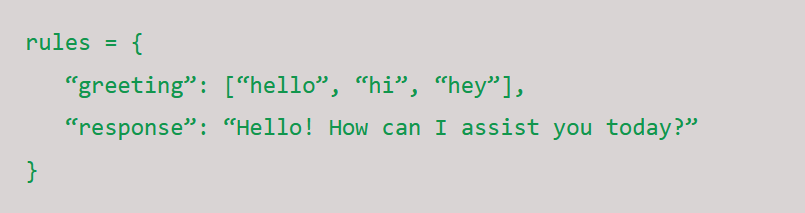
2. Define Rules
Create a set of conditions for recognizing greetings and generating responses: python
3. Process User Input
Convert user input to lowercase and check for greeting words: python

4. Expand Functionality
Improve your chatbot by adding more rules or integrating simple ML models to handle a wide range of queries.
Selecting the right tool is essential to support the development and optimization of the AI agent. We also verify compliance with data protection regulations and industry standards like GDPR and CCPA.
Train the AI agents
Now is the time for your AI agents to prepare for performing the tasks. If the selection is to choose a pretrained LLM, there would be a need to fine-tune the LLM to deliver the desired outcome.
If the selection is training an intelligent agent from scratch, you will need labeled data. Use the supervised learning method that includes historical records and knowledge pairs, and then feed this data to machine learning algorithms. To ensure the model generalizes well to unseen data and avoids overfitting, we also apply cross-validation during the model training process.
The outcome of this step is to create a brain for the AI agents that is ready. So it could be either a trained model file or a thoroughly configured external model.
Integrate with User Interfaces and Enterprise Systems
An intelligent agent is useless if it can not interact with your business environment. This step involves integrating the agent with the user-facing platforms where it will operate and ensuring access to a comprehensive knowledge base. Key integration points include:
- The user interface, such as a chatbot interface on your website
- An internal application for your employees
- A seamless connection to your CRM, ERP, or other enterprise systems
When integrating the AI agent, ensure compatibility with your existing technology stack to maximize flexibility and ease of deployment.
The goal of this step is to make the agent a natural and accessible part of your existing workflow.
Testing & Optimization
Before deploying the artificial intelligence agent, test it thoroughly to find any errors or performance issues.
So you are already done with the process of “how to create an AI agent?” But here comes a crucial step!
Once the agent is created, it should be thoroughly tested. The testing process often creates new data stores or resources to support validation and optimization. Test and iterate. Use feedback to improve it.
Simulated Incident Testing: Test the AI agents by giving them simulated incidents to see how well they identify, classify, and resolve them.
Human-in-the-Loop Testing: Upon deploying the AI agents, let human technicians review and intervene when the AI requires assistance with incidents.
Continuous Learning: As new data comes in and more incidents get resolved, make sure the AI can learn from each case to improve over time.
Deploy & Monitor Agent Performance
With testing complete and your agent optimized, it’s time for deployment. The AI agent is now live and working in a real-world setting. At this stage of the development process, it is essential to select the deployment options. Decide whether to host your agent on-premise or in the cloud.
However, the work doesn’t stop here. Continuous monitoring is crucial to ensure long-term success. Use analytics tools and monitoring systems to track key metrics such as:
-
User interaction and adoption rates
-
Accuracy and efficiency
-
Latency and response times
As the growing ecosystem of AI tools and integrations expands, you can leverage new compatible solutions to further enhance your agent’s capabilities over time. Based on this ongoing feedback, our team implements regular updates and improvements. This is to ensure that your AI agent remains relevant, effective, and a powerful asset for your business.
Applications of AI Agents in Businesses Across Industries
AI agents can do a lot today and even more tomorrow. But that is only possible if you use them as a catalyst for change. This means moving beyond pilots and point solutions to reimagine how your business operates. Let us take a look at some of the real-world applications of AI agents across varied industries.
AI Agents as Medical Assistants
AI in healthcare has already demonstrated its capability to deliver excellence in medical processing. AI agents can help users track essential health metrics, analyze patterns, and receive instant feedback.
By leveraging the following: AI using LangChain Groq for Llama 3 inference and Crew AI for task orchestration, and RapidAPI to fetch real-time blood glucose data.
An autonomous AI agent-based system can handle tasks like
-
Evaluation of data to generate personalized health recommendations through an analysis agent
-
Retrieval of glucose levels using a data fetcher
AI Agents in Customer Service and Support
According to the studies, almost 85% of CX leaders say customers will drop a brand if their issue isn't resolved on the first contact, according to Zendesk's CX Trends 2026 report (previously cited a 2020 Forbes stat: "96% of customers are likely to leave a business due to poor customer service").
AI agents can improve customer interactions independently by making them faster, more realistic, and engaging. In fact, PwC's 2026 AI Agent Survey found that customer service (57%), sales and marketing (54%), and IT and cybersecurity (53%) are the leading business functions where companies are already using, or plan to use, AI agents (figures refreshed from the original 2024 survey chart).
For example, AI chatbots and virtual assistants like Alexa and Siri use deep natural language processing to evaluate the customer’s sentiments, provide personalized support, and handle complex queries. When embedded in AI agents, the technology can enhance customer interactions while minimizing operational costs and reducing wait times. This type of artificial intelligence agent can learn from user interactions. As they learn, they become more personalized and effective over time.
Autonomous Business Operations
AI agents can handle tasks like checking inventory, processing invoices, and updating customer information. They act like virtual staff members. For example, a retail startup uses an AutoGen-based agent to match Shopify orders with supplier inventories. This helps notify staff when they need to restock items, reducing manual work by 60%.
Custom AI Agents for Core Business Operations
The specific AI agent use cases for a particular industry sounds great. But how about having a completely custom AI agent for your business with all the requisites and advancements that you have in the mind? Well, that is what our custom artificial intelligence agent development can bring to you.
Using predefined rules-based LLMs, we combine them with RAG or leverage AI agent frameworks as needed to create custom solutions built to deliver excellence. We design AI agents with security in mind.
We create custom AI agents by implementing appropriate guardrails and following core principles to ensure the highest standards of security. This means granting the agent only the minimum access necessary to perform its tasks, reducing the risk of unauthorized actions.
Multi-Agent Frameworks: When One Agent Isn't Enough
A single agent works well for a narrow, well-defined job. But once a workflow needs multiple steps handled by different models or different specialties – for example, one step that researches, one that writes, and one that fact-checks – it is usually better to split the work across many agents rather than asking one agent to do everything.
- LangGraph – A graph-based multi agent framework for orchestrating non-linear workflows, where agents can loop back, branch, or wait on each other.
- CrewAI – A Python-based framework that organizes agents into “crews” with defined roles, making it easy to assign a specific action to each agent.
- AutoGen – Microsoft's open-source framework for coordinating many agents that communicate with each other to solve a task collaboratively.
- MetaGPT – Structures each agent like an employee inside a virtual company, with each one following a strictly specialized workflow.
These frameworks give you the building blocks for orchestration – queuing tasks, passing context between agents, and handling failures – so you do not have to build that coordination layer from scratch. If you are comparing options, our guide to AI agent frameworks breaks down the top picks in more detail.
The Future of Building An AI Agent
The future of AI agents looks promising for businesses planning to build their own AI agents. Advancements in artificial intelligence are creating new opportunities for companies and industries to better serve their target audience. Here are some trends we can expect in the coming years:
More Personalized Interactions: AI agents will learn and adapt to provide more personalized experiences. For example, AI customer service agents might remember past interactions and suggest tailored advice or solutions.
Greater Integration with IoT: AI agents will work better with the Internet of Things (IoT). For instance, AI agents could help manage home automation or improve energy use in smart buildings.
Emotional Intelligence: AI agents will become more aware of emotions. They will be able to detect feelings and adjust their responses, which can improve customer experiences, especially in healthcare and education.
Ethical AI Implementation: As AI agents will be considered for more significant roles. So, there will be a strong focus on making sure AI agents are transparent, fair, and follow ethical guidelines.
Multi-Agent Collaborations: When building an AI agent for complex tasks, using a single agent can be limiting. Multi-agent systems can help with this. By partnering with a reliable AI company, you can leverage the benefits of multi-agent collaborations rather than sticking to managing with single ones. Get the custom AI Agent built for your specific use case.
Best Practices for Building an AI Agent
Whether you are shipping your first agent or your tenth, a handful of practices consistently separate the ones that make it to production from the ones that stall in a demo.
- Start small – Pick one workflow, ship it, and prove the value before adding scope. A specialized agent that reliably handles one job beats a general one that handles ten jobs poorly.
- Give it a clear set of rules – Define exactly which specific actions the agent can take on its own, and which ones need a human to approve first, especially anything irreversible like sending emails or processing a payment.
- Provide the right context – An agent is only as good as the information you give it. Connect it to accurate, current data instead of relying on what the underlying model already “knows.”
- Try different models – The right model depends on the job. Test a couple of options for cost, speed, and accuracy before you commit to one for production.
- Make it explain itself – Log the reasoning and tool calls behind every action, so you and your users can understand why the agent did what it did.
- Watch it in production – Track accuracy, latency, and user feedback after launch the same way you would for any other piece of software, and adjust as real usage reveals edge cases you did not plan for.
Prefer to learn by watching someone build one step by step? Our YouTube channel walks through several of these builds end to end, from writing the first prompt to deploying the finished agent.
Bottom Line
Building an AI agent is a process that combines technical excellence with business strategy. While the process involves multiple complex steps, the right approach and expert guidance can help you attain success.
As a leading AI development company, we have years of development experience in proven methodologies that deliver results. So, whether you are building your first agent or scaling an existing AI initiative, we are here to help!

Mangesh Gothankar


Ashwani Sharma
Achin Verma
Frequently Asked Questions
Have a question in mind? We are here to answer. If you don’t see your question here, drop us a line at our contact page.
How to build AI Agent from Scratch?

How AI agents work?
1. Perceive: They gather data from their environment using tools like cameras and microphones.
2. Reason & Plan: They analyze the information to understand situations, break down goals into smaller tasks, and create action plans.
3. Act: They execute actions based on their analysis, either through physical robots or by sending digital commands.
4. Learn & Adapt: They continuously improve by learning from experiences, user feedback, and new information.
What is the difference between an AI Agent and a Chatbot?
An AI chatbot usually follows a script or flowchart. On the contrary, an AI agent can make decisions, use reasoning, and perform actions as well, based on the chosen type.
Can we use LangChain or LangGraph as a Framework for agents?
How to find the top AI agent development company in the USA?
To find the best artificial intelligence agent development companies in the USA, look for those with a strong track record, positive client stories, and innovative AI solutions. Signity Solutions stands out because of its expertise in custom AI agents and its success in various industries.
How much does it cost to build an AI agent?
The cost of building an AI agent can vary significantly based on the type and complexity of the task it is designed for. However, to get an accurate quote, get in touch with the top AI development experts and discuss your requirements today.
How to create your own AI agent?
There are several platforms that allow you to build your own artificial intelligence agents. You can easily create langchain agents, vertex ai agents, chatgpt agents using the pre build frameworks or open AI capabilities. However, to create it for your specific use case with all the customizations, you need the experts help to get it done right.
How to make an AI agent without coding?
How much does it cost to build an AI agent?
How long does it take to build an AI agent?





.png?width=352&name=agentic-ai-strategy-for-enterprise-software%20(14).png)
.png?width=352&name=Why%20Enterprise%20AI%20Pilots%20Fail%20And%20How%20to%20Fix%20Them%20(1).png)