


.png?width=27&height=27&name=Group(1).png)

-1.svg)
-1.svg)


-2.svg)


%201-1.webp?width=148&height=74&name=our%20work%20(2)%201-1.webp)




.svg)





-1.png?width=670&height=445&name=agentic-ai-strategy-for-enterprise-software%20(4)-1.png)
Your teams are already using ChatGPT and Gemini.
But they’re switching tabs, copying outputs into spreadsheets, and manually executing tasks.
That’s not automation. That’s assisted typing.
The real opportunity? Turning AI into a workflow engine that executes actions, updates systems, and drives measurable business outcomes.
The real opportunity is not better AI responses. It is AI that executes workflows inside your business systems.
And this is where interactive AI UI with MCP transforms AI from a chat tool into an operational engine.
Gartner projects that by 2026, over 40% of new enterprise applications will embed conversational AI UI as a primary interface layer.
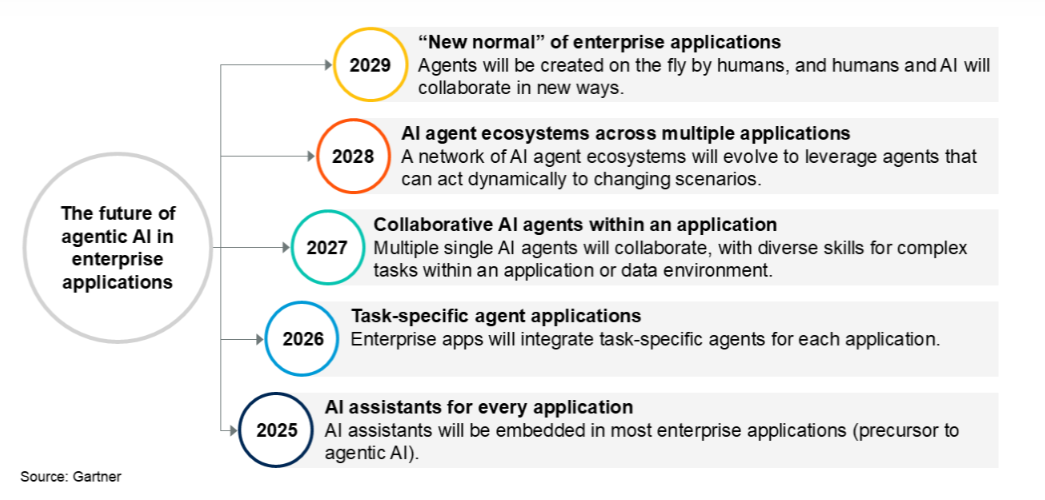
source: gartner
The numbers mark the turning point. AI is no longer just generating text. It is generating interfaces. Platforms like ChatGPT and Gemini are evolving into dynamic AI platforms with MCP server development UI capabilities.
Through MCP Apps, these systems can render UI elements such as interactive charts, structured forms, editable tables, maps, and visual dashboards, as well as context-aware workflow components.
Instead of returning static answers, AI can now access tools by executing business logic and rendering UI components to display structured data. In short, it enables user control within the conversation.
The shift defines modern AI UI design for ChatGPT and for Gemini. It merges intelligence with workflow within a single interface.
- For designers, it means reimagining UI/UX.
- For developers, it means integrating JSON-RPC communication with secure rendering pipelines.
- For businesses, it means measurable workflow improvements.
Since we are entering an era where conversational AI UI becomes the front door to enterprise systems, let’s dig into how they can be harnessed for business progress in detail.
 Generate
Key Takeaways
Generate
Key Takeaways

- MCP Apps transform ChatGPT apps into workflow-driven AI applications.
- Effective AI UI design blends prompt intelligence with structured UI components.
- JSON-RPC enables secure communication between rendering layers and data systems.
- Multimodal AI interfaces improve clarity and workflow completion rates.
Why AI Pilots Fail to Deliver Business ROI?
Many organizations experiment with AI. Few operationalize it. Some of the common reasons AI initiatives stall is AI is disconnected from backend systems. It means the outputs are static text rather than actionable interfaces.
Besides, AI systems are mostly established without a governance layer controlling system access. It means no measurable KPIs tied to workflow improvement.
When AI cannot update systems, validate inputs, or execute defined business logic, it remains a helper that enhance productivity.
To unlock ROI, AI must move beyond conversation and into the execution process.
The Evolution of AI UI Design for ChatGPT & Gemini
Early conversational AI focused on the prompt-to-response paradigm.
The procedure includes minimal UI of a message box, text output, and basic formatting. But as enterprise adoption accelerated, that model became limiting.
Users needed structured data, interactive controls, and real workflow execution. Therefore, the AI UI design for ChatGPT and AI UI design for Gemini now follow a layered architecture:
1. Intelligence Layer
The AI model interprets intent, context, and user persona.
2. Tool Layer
The assistant calls structured tools that execute business logic and return tool results.
3. Communication Layer
JSON-RPC manages secure data exchange between client and server.
4. Rendering Layer
The platform dynamically renders UI components within the conversation.
The architecture transforms the interface from static chat into a functional app. Instead of displaying raw data, the AI can render charts, editable tables, and other visualizations directly within ChatGPT apps or Gemini environments.
Designers must now think beyond UI/UX for websites. They must design a conversational AI UI that preserves context, supports structured interactions, and prioritizes security.
What Interactive AI Actually Means for Your Business?
Interactive AI UI means your AI system can pull live data from enterprise systems. It display structured dashboards inside conversation allowing users to approve or edit information. It even triggers defined backend workflows and return confirmation with audit visibility.
In short, AI becomes an execution layer rather than generating suggestions.
For example, a sales manager asks, “Show this quarter’s top 10 accounts and update the forecast.”
Instead of returning text, the AI renders a dynamic table that allows inline edits and updates the CRM upon approval.
That’s the difference between intelligence and infrastructure.
What Are MCP Apps and Why They Redefine AI Platforms with MCP UI?
MCP Apps extend the Model Context Protocol by allowing tools to return interactive UI elements. Instead of outputting plain responses, tools can return metadata, structured data, and a UI bundle that the AI client can render.
In simple terms, MCP Apps allow AI platforms with MCP UI to access backend systems by executing defined functions. It allows rendering dynamic UI components and capturing user feedback. Moreover, it sends structured updates back to the server.
The key shift is the separation of concerns:
- AI handles intelligence and context
- Tools execute business logic
- UI handles interactions
- JSON-RPC ensures secure communication
It makes AI platforms more than chat interfaces. They become interactive application layers capable of managing workflows, displaying data visually, and enabling controlled user actions.
For developers, MCP apps unlock implementation flexibility, and for designers, they bring creative interface capabilities. Besides, for businesses, it can unlock unmatched efficiency. That is why MCP Apps redefine modern conversational AI UI.
Related Read: AI Agents, MCP Protocols, and the Future of Smart Systems
Real Business Scenarios: How Interactive AI Changes Operations?
SMB Operations
A 40-person logistics company uses AI for shipment reports but staff still manually update the ERP.
With Interactive AI UI:
- Pulls live shipment data
- Displays an editable dashboard
- Updates ERP upon approval
Impact: Eliminates hours of weekly manual work.
Enterprise Finance
A CFO asks, “Show revenue variance by region and flag anomalies.”
Instead of analyst dependency:
- AI renders dynamic charts
- Flags outliers automatically
- Enables drill-down
- Exports structured insights
Impact: Decisions move from days to minutes.
HR & Onboarding
HR teams manage onboarding across emails and multiple systems.
With Interactive AI:
- Displays onboarding checklist
- Captures approvals
- Triggers account provisioning
- Logs completion automatically
Impact: Reduced friction, faster employee activation.
Core Architecture Behind Interactive AI UIs
How Interactive AI Operates Securely Inside Enterprise Systems?
To ensure control and scalability, interactive AI follows three principles:
- Controlled System Access: AI can only execute predefined business functions.
- Structured Outputs: Every result follows a defined format, reducing ambiguity and the risk of error.
- Secure Rendering: Interfaces operate within isolated environments to prevent system exposure.
The goal is predictable automation and not uncontrolled intelligence.
Tool Results, JSON-RPC, and Secure Rendering
|
Component |
Role |
Security Contribution |
|
Tool Results |
Return structured data (tables, states, metadata) |
Prevents unstructured or unpredictable output |
|
JSON-RPC |
Standardized communication protocol |
Controls method calls, parameters, and responses |
|
Sandboxed Rendering |
Isolated UI execution environment |
Prevents direct system access or unsafe script execution |
In AI UI design for ChatGPT, separation of concerns is critical. Business logic should handle validation, calculations, permissions, and data access.
UI components should only manage rendering to execute interactions and user feedback. Besides, the AI layer interprets context and selects tools but never directly manipulates sensitive system.
Such structure improves long-term maintainability across AI platforms with MCP UI.
AI UI Design for ChatGPT: Workflow-Driven Conversational Interfaces
Modern ChatGPT UI design must prioritize workflow than conversation. Instead of long responses, the system should render UI elements that guide structured action.
The AI provides context, the interface enables interaction, and tools execute business logic. It helps to create a dynamic and task-oriented conversational AI UI.
Designing for New Users and Power Users
Effective design adapts to user maturity. New users need guided flows, simplified controls, and clear feedback. Power users expect faster execution, advanced filters, and export capabilities. Progressive disclosure ensures the interface remains intuitive while unlocking deeper functionalities for experienced users.
AI UI Design for Gemini: Multimodal AI Interfaces at Scale
AI UI design for Gemini requires a stronger emphasis on multimodal AI interfaces. Unlike text-first systems, Gemini operates across documents, images, structured data, and cross-device environments. The interface must support dynamic rendering of UI components that respond to context in real time.
Designers must account for large datasets, enterprise workflows, and distributed teams. The AI interprets intent, tools process data, and the UI renders interactive components such as charts, file previews, and dashboards. The goal is not just interaction but coordinated intelligence across systems.
Context-Aware UI Rendering Across Devices
Gemini-based interfaces must adapt seamlessly across device types, such as desktop, tablet, and mobile. Context-aware rendering ensures that UI elements adjust their layout, density, and interaction style without disrupting workflow continuity.
For example, a complex dashboard may display full analytics on a desktop but shift to simplified stacked components on mobile. The AI maintains conversation context while the UI dynamically adapts presentation.
Consistency in font family, spacing, and interaction patterns ensures familiarity, even as layout changes.
Integrating Files, Maps, Charts, and Dynamic Components
AI UI design for Gemini must integrate structured data sources directly into the conversational flow. This includes:
- File previews and document interaction
- Maps for geospatial visualization
- Interactive charts for analysis
- Editable tables for structured updates
Each component should communicate with backend tools and reflect real-time changes to data. Also, secure rendering and structured tool results ensure the interface remains reliable.
Generative AI UX Design Principles for Modern AI Platforms
Generative AI UX design must move beyond aesthetic UI/UX and focus on intelligent interaction design. Modern AI platforms with MCP UI require interfaces that support dynamic workflows, structured data exchange, and active contextual intelligence.
Core principles include clarity that is worked through action-driven rendering, context preservation, and secure interaction boundaries. Designers must create experiences where AI capabilities feel natural. Every component should exist to do more than just display information and move the workflow forward.
User Persona Mapping and Interaction Flow
Persona Type |
Primary Goals |
Interaction Needs |
UI Design Approach |
New Users |
Understand system capabilities |
Guidance, simplified controls, clear description |
Progressive disclosure, tooltips, linear workflow flow |
Operational Users |
Execute defined tasks |
Structured inputs, predictable steps |
Clear action buttons, minimal visual clutter |
Analysts |
Explore & analyze data |
Filters, editable tables, charts, deeper controls |
Dynamic UI components with expandable options |
Executives |
Review high-level insights |
Visual summaries, dashboards, fast access |
Clean layouts, concise data display, decision-focused actions |
Interaction Flow Principle:
Prompt → AI interprets context → Tools generate structured results → UI components render actions → User input updates workflow → Feedback confirms execution.
Feedback Loops and Interaction Intelligence
AI interfaces must continuously communicate. When users submit input, the system should display immediate feedback. Here, interaction intelligence means the UI adapts to context, creating a responsive experience that improves long-term usability.
Most importantly, interfaces must prioritize clarity and decision speed over visual complexity.
What Does It Take to Implement Interactive AI?
Business leaders often ask questions like How complex is integration? Will this disrupt existing systems? Can it scale across teams?
Interactive AI implementation typically involves mapping high-value workflows first. It needs to define approved business functions and integrate with APIs of core systems. Further, it demands establishing access control and monitoring.
Most organizations begin with one operational use case and scale gradually. However, the focus should be impact-first and not feature-first.
Implementation Framework
Designing AI UI for ChatGPT and Gemini with MCP UI requires an engineering-first approach. Below is a clarity-focused breakdown combining process steps and best-practice checkpoints.
Step 1: Define Tools and Functions
Each tool should include a clear name and description with a strict input schema. There must be a structured output format with permission boundaries:
Ideal Structured Data Flow
- User submits prompt
- AI selects a tool
- The tool executes business logic.
- Structured results return via JSON-RPC
- UI components render dynamically.
- User interaction updates the workflow.
The predictable flow prevents random execution and supports scalable implementation.
Step 2: Building Secure MCP Apps with Version Control
Security must be embedded at every layer.
|
Layer |
Security Focus |
Why It Matters |
|
AI Layer |
Controlled tool invocation |
Prevent unauthorized execution |
|
Tool Layer |
Permission validation |
Protect sensitive data |
|
UI Layer |
Sandboxed rendering |
Prevent script injection |
|
API Layer |
Version control |
Avoid breaking changes |
Ideal Version Control Strategy
- Maintain versioned tool schemas.
- Avoid modifying production tool contracts abruptly.
- Deprecate gradually with backward compatibility.
- Document changes clearly for developers and designers.
Stable versioning protects live ChatGPT apps and Gemini integrations from unexpected failures.
Step 3: Performance, Speed, and Security Best Practices
Performance directly impacts user trust in conversational AI UI. Therefore, your performance Checklist must aim to:
- Optimize backend queries.
- Minimize payload size in tool results.
- Lazy-load heavy UI components.
- Cache non-sensitive data where possible.
- Monitor the latency between the tool call and rendering.
A fast and structured implementation ensures that AI platforms with MCP UI remain reliable. When developers treat architecture, versioning, and performance as first-class concerns, interactive AI transitions to support enterprise-grade infrastructure.
Measuring Success in Conversational AI UI
Interactive AI UI design for ChatGPT and Gemini should be evaluated on performance benchmarks. Traditional UI metrics, such as clicks and session duration, are unable to capture the full potential of AI platforms using MCP UI.
Therefore, success must align with business outcomes, like:
- Task completion rate
- Time to execute workflow
- Error frequency
- Drop-off points in the interaction flow
- Tool invocation accuracy
- User feedback quality
The goal is simple: reduce friction while increasing operational speed and control.
Engagement vs Workflow Completion
High engagement does not always equal effectiveness.
|
Metric Type |
Measures |
Risk of Overvaluing |
What Actually Matters |
|
Engagement Metrics |
Time spent, clicks, interaction depth |
Users may be confused or stuck |
Clear, fast workflow execution |
|
Workflow Completion Metrics |
Task success rate, time to action, and successful tool results |
Requires structured tracking |
Direct business impact |
In conversational AI UI, fewer interactions with faster completion often signal better design. Besides, the efficient workflows indicate that UI components, tool results, and structured data flow are all functioning correctly.
Continuous Improvement Through User Feedback
Generative AI UX design must evolve continuously. Improvement methods include monitoring failed tool calls and analyze incomplete workflows.
The additional tactics include the review of structured feedback prompts, A/B test UI components and necessary tracking of version-based performance changes. Also, feedback loops must be embedded directly in the interface with quick rating prompts and contextual error reporting to trigger adaptive UI adjustments.
All in all, conversational AI UI is a continuously learning performance-driven system that must adapt with each version update.
The Future of AI UI Design: From Chat Apps to Intelligent Workspaces
AI interfaces are rapidly evolving from reactive chat apps into intelligent workspaces. The next generation of AI UI design for ChatGPT and Gemini will not revolve around isolated prompts, but around persistent context-aware environments that support full workflows.
Future AI platforms with MCP UI will likely include:
- Persistent session memory across projects
- Real-time collaborative UI components
- Adaptive dashboards that evolve based on user persona
- Cross-device continuity without workflow loss
- Deeper integration with structured data systems.
Instead of asking users to switch between multiple apps, the AI will orchestrate tools and business logic within a single unified environment.
Multimodal AI interfaces will expand further combining text, image, and file interaction. Designers will focus more on interaction intelligence. Developers will prioritize structured rendering and secure execution pipelines.
The future is an AI-powered operational infrastructure delivered through intelligent UI layers.
Conclusion
AI UI design for ChatGPT and Gemini has entered a new phase. They are being driven by structured tool execution, dynamic UI components, and secure MCP-based rendering.
Modern conversational AI UI is no longer about generating responses. It is about enabling action.
By separating business logic from UI components, leveraging JSON-RPC for structured communication, and designing workflow-driven interfaces, organizations can transform AI from an assistant into a productivity engine.
Teams that treat AI UI design as product architecture will gain improved user control and scalable innovation across AI platforms with MCP UI.

Mangesh Gothankar


Ashwani Sharma
Achin Verma
Frequently Asked Questions
Have a question in mind? We are here to answer. If you don’t see your question here, drop us a line at our contact page.
What is AI UI design for ChatGPT?

AI UI design for ChatGPT involves creating interactive UI components that render inside ChatGPT using MCP Apps.
Instead of returning only text, the system can display structured results, such as charts, editable tables, and dashboards.
It combines intelligence, business logic, JSON-RPC communication, and secure rendering to enable action-driven conversational experiences.
How do MCP Apps improve AI platforms with MCP UI?
MCP Apps allow AI platforms to return dynamic UI elements. Tools execute defined functions that operate on structured data to trigger UI rendering within the conversation.
It enables controlled user interactions, transforming AI into an interactive application layer.
What is the difference between AI UI design for ChatGPT and AI UI design for Gemini?
AI UI design for ChatGPT focuses heavily on structured tool invocation driven to achieve conversational workflows. On the other hand, AI UI design for Gemini emphasizes multimodal AI interfaces including file previews and cross-device context awareness.
Both may rely on structured rendering, but ecosystem integration differs.
What technical considerations are essential when implementing interactive AI UI?
Developers must define strict tool schemas.
They can use JSON-RPC for structured communication and keep business logic separate from UI components and sandbox rendering environments.
Besides, role-based access control can be implemented with version control maintenance for tools. Performance optimization and secure data handling are critical for enterprise-grade AI platforms with MCP UI.





.png?width=352&name=agentic-ai-strategy-for-enterprise-software%20(16).png)
.png?width=352&name=agentic-ai-strategy-for-enterprise-software%20(11).png)