

.png?width=27&height=27&name=Group(1).png)

-1.svg)
-1.svg)


-2.svg)


%201-1.webp?width=148&height=74&name=our%20work%20(2)%201-1.webp)




.svg)





You get your answers using AI tools, and then your employees act on them. What if someone points out that the policy already changed months ago? This is quite a common problem enterprises face with AI.
This happens because the model was trained on past data and is not aware of the latest compliance guidelines, internal documents, and more. And to fill the gap between what the AI knows and what your business needs, RAG systems come to the rescue.
The Retrieval Augmented Generation has now become the backbone of enterprise AI, and there are numbers that back it up. The global RAG market was valued at around $1.3 billion in 2024 and is expected to rise to $74.5 billion by 2034, at a CAGR of around 50%.
So, are you curious to know what exactly the RAG system is and how to build a RAG system that works well for your business?
In simple terms, RAG is something that helps connect your AI to your own knowledge, documents, databases, and more. It then allows enterprises to extract relevant information in real-time before responding. Unlike the traditional model that relies on static training data, a custom RAG system enterprise extracts from live and authoritative data sources to give an accurate response.
This blog is a practical guide to building a custom RAG system for enterprise knowledge management. Whether you're a CTO evaluating options or an engineering lead ready to build, you'll leave with a clear picture of what it takes and where to start.
 Generate
Key Takeaways
Generate
Key Takeaways

- RAG systems eliminate hallucinations by grounding responses in your authoritative data sources.
- Hybrid search always outperforms pure semantic search or keyword search alone in enterprise environments.
- Custom RAG systems beat off-the-shelf tools when data privacy and proprietary data are non-negotiable.
- RAG implementation is an ongoing process, not a one-time built
What is a RAG System and Why Do Enterprises Need It?
Businesses today run on large language models. No matter if it's a chatbot, internal assistant, or tools that help the team draft content, they use the same generative AI model. However, there is a limitation of generative AI models, and that is, they only know what they are trained on.
That means the moment your business generates new data, like an updated policy document, a new product release, and more, your AI is already behind. It's working from static knowledge that has no connection to your live systems, your knowledge bases, or your external databases.
This is where RAG comes in.
So, What Exactly Is a RAG System?
A RAG system is an AI architecture that enhances generative AI models by connecting them to external knowledge sources when the user asks a query. Rather than relying solely on what the model learned during training, it goes out, searches for relevant documents, retrieves the most useful information, and generates a response.
Think of it this way: a standard LLM is like an expert who studied hard but has been off the grid for a year. A custom RAG system enterprise team deploys the same expert, now with a live internet connection and access to your entire company's filing system.
It offers accurate responses, grounded in factual information, and directly tied to your proprietary data.
Why Standard AI Falls Short in Enterprise Environments
Off-the-shelf foundation models, no matter how strong they are, are not built to handle the complexity of enterprise knowledge. Here's why:
1. Their training data has a cutoff
These models stop learning at a point in time. Anything that happened after that, new regulations, updated SOPs, or recent product changes, simply doesn't exist for them.
2. They have no access to your proprietary data
Your internal documents, CRM records, technical documentation, and knowledge bases are invisible to a standard model. It cannot retrieve relevant information from systems it has never seen.
3. They can't pull from multiple data sources
Enterprise knowledge lives across multiple data sources like SharePoint, Salesforce, PDFs, and more. A generic model has no way to search across all of these and surface what's actually needed.
4. They hallucinate
Without access to external knowledge, these models fill gaps by generating plausible-sounding answers. It can be annoying for the users. In an enterprise context, legal, finance, healthcare, and compliance, it can lead to serious risks.
What a Custom RAG System Changes
A custom RAG system enterprise built for your enterprise solves every one of these problems. It gives your AI a direct connection to your external knowledge sources, keeps responses grounded in up-to-date information, and ensures every answer can be traced back to a real, authoritative data source.
How Does Retrieval Augmented Generation Work?
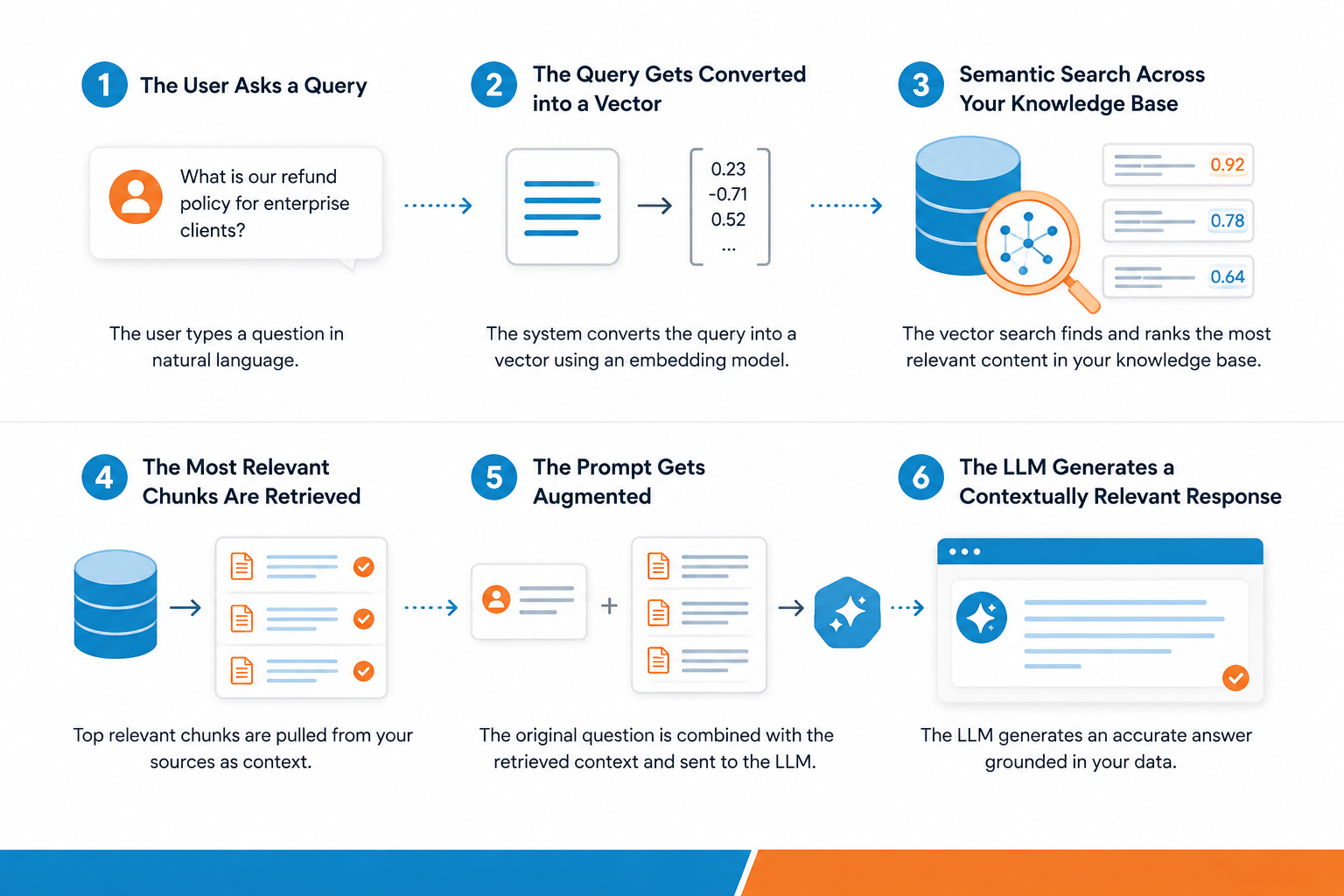
Technical guides make this process complicated. However, its working is very simple. The retrieval augmented generation follows a simple and straightforward approach. It asks the query, the system finds the information that is relevant from the knowledge base, and AI helps generate accurate information. Here are the steps it follows:
1. The User Asks a Query
Everything starts with a user query, a plain-language question typed by the user. Something like "What is our refund policy for enterprise clients?" The prompt has to be specific, and it actually kicks off the retrieval process.
2. The Query Gets Converted Into a Vector
The system won't search for the query word-by-word; it runs the query via an embedding model. It is a specialized model that converts the text into vectors.
The vectors seamlessly capture the semantic meaning of your query and the actual intent behind it. This makes the semantic search powerful compared to traditional keyword search.
3. Semantic Search Across Your Knowledge Base
The vector representation of the query then runs a semantic search across the database. It holds the numerical representation of your knowledge base. The system then scans via external data and ranks stored chunks by how it matches the semantic meaning of the query. It surfaces the relevant documents even when the query doesn’t match exactly.
4. The Most Relevant Chunks Are Retrieved
The information retrieval component pulls the highest-scoring retrieved chunks, small, focused segments of your source data that are most likely to contain the answer. These chunks come from your authoritative data sources, internal wikis, policy documents, databases, technical documentation, and more.
This is what separates a RAG system from a standard LLM. It retrieves relevant information directly from your external knowledge sources before saying a word.
5. The Prompt Gets Augmented
So, before AI generates the response, the system performs one more task: it packages the original prompt with everything it retrieved and sends it to the language model at once.
So instead of the model working with just "What is our refund policy for enterprise clients?", it now has that question plus some highly relevant document sitting right alongside it.
Recommended Post: 10 Real-World Examples of Retrieval Augmented Generation
6. The LLM Generates a Contextually Relevant Response
Finally, the language model reads both the question and the retrieved knowledge and produces a contextually relevant response, one that's grounded in your proprietary data, not guesswork.
The difference from a standard LLM response is significant. Because the answer is based on retrieved information from authoritative data sources, it stays accurate, traceable, and up to date, even as your business data keeps changing.
Core Components of a Custom RAG Pipeline
A custom RAG pipeline has five core components, and getting each one right is what separates a system that works in a demo from one that holds up in real enterprise environments.
1. Data Ingestion Layer
Enterprise knowledge does not remain settled in one place. Rather, there are PDFs, documents, CRM records, and a lot more, where the information is kept. The ingestion layer helps connect all these multiple data sources, gathers content, cleans it, and prepares it for indexing.
The most critical aspect here is keeping the data up to date. The ingestion pipelines must run on schedule so that when the new data comes to the system, it flows into the RAG system automatically.
2. Chunking Strategy
Once your source data is ingested, it needs to be broken down into smaller pieces called chunks. You can't feed an entire policy document into a search; you need the specific section that actually answers the question.
Good chunking means each piece is just the right size, carries full context, but not so large that it buries the relevant part. There are a few ways to approach this, and a few of them are fixed chunking, semantic chunking, hierarchical chunking, and more.
3. Embedding Model
Once your content is chunked, each piece gets passed through an embedding model. This model converts your text data into numerical representations that a vector database can store and search.
What makes a good embedding model for an enterprise? A few things matter:
- Domain alignment: general models work well for most use cases, but if your business deals in highly specialized data, a fine-tuned model will give you much sharper results
- Speed: In production environments, the embedding pipeline needs to be fast. Slow embeddings mean slow retrieval, and slow retrieval means frustrated users.
- Data privacy: If your proprietary data cannot leave your infrastructure, you'll want an open-source embedding model you can run on-premise rather than calling an external API.
4. Vector Database
The vector database is the engine behind your semantic search. It stores all those numerical representations generated by your embedding model and makes it possible to search across millions of retrieved chunks in milliseconds.
For businesses, the vector database needs to handle more than speed. It should support multiple data sources indexed in a unified place, offer role-based access, ensure metadata filtering so users can search documents that are relevant, and offer scalability.
5. Retrieval System and Hybrid Search
The final component is your retrieval system, the layer that actually decides which retrieved chunks get passed to the LLM when a user asks a question.
Pure semantic search is great for conceptual questions. But enterprise users ask all kinds of questions; some need semantic understanding, others need exact matches on product codes, names, or policy numbers. Relying on just one approach means missing half the picture.
That's why production RAG systems use hybrid search; a combination of semantic search and keyword search working together. The results from both are merged and re-ranked, so only the most highly relevant chunks make it into the final augmented prompt.
Step-by-Step RAG Architecture Guide
Building a custom RAG system that can hold the enterprise environments is not about picking the right tools only. Here is a complete process and a step-by-step guide for the RAG architecture.
1. Define Your Knowledge Scope
Be clear about what your system should know and who it will be serving, before you write the code. What external knowledge sources will you connect? What are your data privacy requirements? These answers shape every technical decision that follows; skipping this step is the single biggest reason RAG implementation projects go off track.
2. Connect and Ingest Your Data Sources
Connect to your multiple data sources and pull everything into PDFs, databases, audio files, spreadsheets, and more. Normalize it into a clean and consistent format. Ensure to tag each record with metadata like source, date, and department. The ingestion pipeline must be automated, so when new data comes in, the flow remains continuous.
3. Chunk and Embed Your Content
Break your source data into focused chunks, then run each one through your embedding model to generate numerical representations. Store everything in your vector database alongside the original text and metadata. This indexed store is your live knowledge foundation. Take the time to get it right because every user query searches against it. This indexed store is your live enterprise knowledge AI foundation; every user query searches against it.
4. Build Your Retrieval Layer
Set up your information retrieval component with semantic search for conceptual questions, keyword search for exact matches, and hybrid search combining both. Add a re-ranker on top to ensure only the most highly relevant chunks reach your LLM. Always test retrieval independently first, and if the right relevant documents aren't being surfaced, no amount of prompt engineering will fix it.
5. Design Your Prompt and Select Your LLM
Package your retrieved information into a clean augmented prompt that instructs the model to answer only from the provided context, not from its training data. Then connect your language model of choice. Thanks to the RAG architecture design that allows you to swap foundation models as better options emerge without rebuilding the retrieval stack.
6. Evaluate, Deploy, and Monitor
Before going live, run structured evaluations on retrieval precision. Once deployed, set up full logging of every user input and generated response, monitor latency, and build in a clear escalation path for low-confidence answers. Deployment isn't the finish line. Your RAG system needs ongoing monitoring to keep performing well.
How Much Does It Cost to Build a Custom RAG System for an Enterprise?
This is one of the first questions enterprise teams ask, and the honest answer is that it depends on how you build it and what you need it to do.
The Main Cost Drivers
Infrastructure, vector database hosting, and data storage scale with the size of your knowledge bases and query volume. Every user query also carries an API cost for the embedding model and the language model generating the response. Teams with strict data privacy needs who run models on-premise trade API costs for infrastructure overhead instead.
Development and Maintenance
Building a custom RAG pipeline, data ingestion, hybrid search, prompt engineering, and deployment requires solid engineering time. As the data sources keep growing and new data flows in, the system will need regular tuning to deliver accurate and relevant responses.
What to Expect
A production-ready custom RAG system for an enterprise typically ranges from $30,000 to $150,000+ depending on scope, integrations, and scale. The right development partner helps you build something that fits your budget without compromising on accuracy, security, or reliability.
Custom RAG vs. Off-the-Shelf Tools
Pre-built RAG solutions are a great starting point for exploration. But when it comes to real enterprise environments, the gaps show up fast. Here's how the two approaches stack up:
| Features | Custom RAG System | Off-the-Shelf Tools |
| Proprietary Data Handling | Full control over your proprietary data | Limited, often restricted |
| Data Privacy | On-premise deployment supported | Rarely available |
| Multiple Data Sources | Connects to all your external databases and systems | Limited connectors |
| Domain-Specific Data | Tuned to your specialized data and industry | Generic, one-size-fits-all |
| Hybrid Search | Fully configurable semantic search and keyword search | Fixed, limited configuration |
| Modular Design | Swap foundation models without rebuilding | Locked into vendor stack |
| Scalability | Built for production environments at enterprise scale | Often capped |
| RAG Implementation | Built around your exact workflows | Rigid, predefined structure |
| Ongoing Customization | Evolves with your knowledge bases and data sources | Dependent on the vendor roadmap |
| Cost Control | Optimized for your actual usage | Subscription costs are regardless of usage |
Concluding Thoughts
A custom RAG system gives your business a reliable, accurate, and secure way to connect your generative AI models to the knowledge that actually matters: your proprietary data and your external knowledge sources.
The difference between AI that guesses and AI that delivers contextually relevant responses comes down to how well your RAG implementation is built. And that's where getting the right partner matters.
At Signity Solutions, we help enterprises design and deploy custom RAG systems end-to-end, from mapping your data sources and building your retrieval systems to tuning for accuracy and scaling for production environments. We don't just build for demos. We build for real business outcomes. If you're ready to stop settling for generic AI and start leveraging your own knowledge, let's talk.

Mangesh Gothankar


Ashwani Sharma
Achin Verma
Frequently Asked Questions
Have a question in mind? We are here to answer. If you don’t see your question here, drop us a line at our contact page.
Q1. Can a custom RAG system work with our existing tools and databases?

Q2. How is the retrieval augmented generation business use different from just using ChatGPT?
Q3. How long does it take to build a custom RAG system?
Q4. What ROI can we expect from a RAG system?