

.png?width=27&height=27&name=Group(1).png)

-1.svg)
-1.svg)


-2.svg)


%201-1.webp?width=148&height=74&name=our%20work%20(2)%201-1.webp)




.svg)





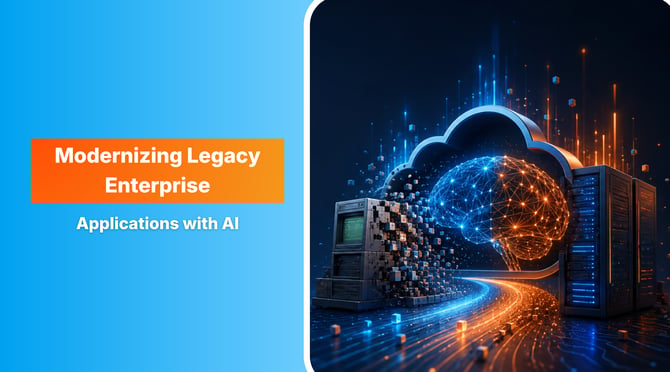
Your AI plans probably aren't held back by the AI. They're held back by the old and outdated systems sitting underneath them.
Deloitte's Tech Trends research makes the point: 60% of AI leaders say legacy system integration, not budget or talent, is their biggest barrier to putting agentic AI into production. The models are ready. The twenty-year-old system running your billing or claims isn't.
You can't just switch these systems off, but the longer they sit, the more expensive modernization gets. Artificial intelligence has changed that math. Work that used to take months of manual effort can now be handled by AI agents that read your software applications, translate the code, and confirm it still behaves the way it should.
Here is a complete practical roadmap that helps with legacy application modernization. Know what works well, where you still need manual intervention, and how to start small.
 Generate
Key Takeaways
Generate
Key Takeaways

- Manual rewrites are slow and risky. AI takes most of that pain away.
- Don't boil the ocean. Fix one module that matters and prove it works.
- Let AI grind through the repetitive code. Keep your people on the architecture.
- The judgment calls, compliance, cutover, edge cases are still a human job.
A Practical Roadmap: Step-by-Step AI-Led Modernization Framework
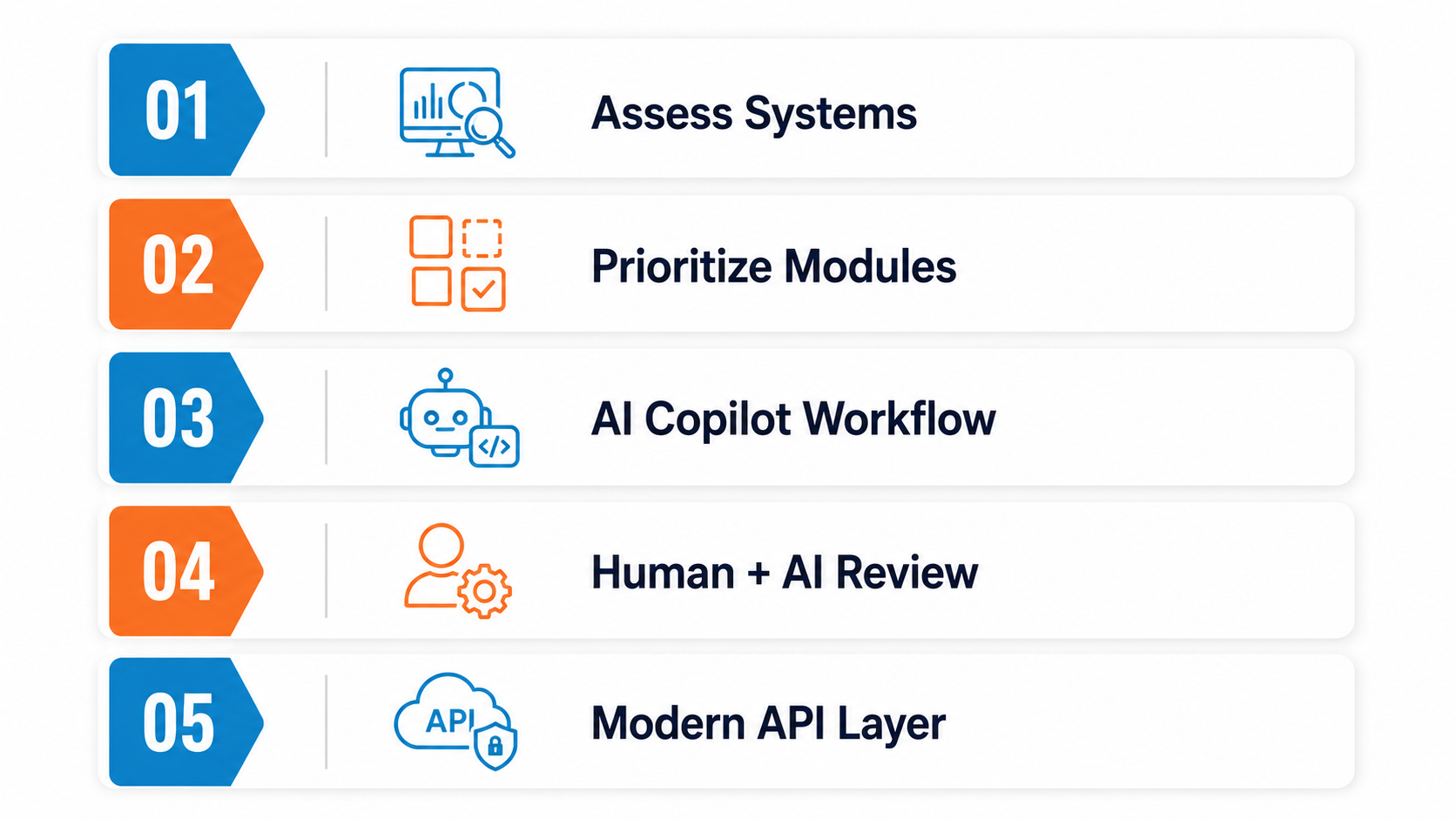
Everything does not need to be modernized at once. And the teams that try it usually regret it in the end. Basically, some steps must be followed to lower the risk of the next.
Step 1: Start with a Comprehensive Assessment
Map what you have before touching anything. AI dependency discovery crawls the codebase and shows how it all fits together and where the technical debt is worst. This is the comprehensive assessment that used to eat weeks of manual review. Now it runs in a fraction of that time, so you're planning against what's really there instead of a guess.
Step 2: Isolate High-Impact Modules First
A full rewrite is where most modernization projects die, so don't start there. Pick one thing that actually hurts. Maybe it's a slow process users keep complaining about, or a module that's blocking a bigger migration. Modernize that, prove it works, and let the team learn the business process on something contained. The business keeps running the whole time.
Step 3: Set up Co-Pilot and Agent Workflows
Get AI into your engineers' daily workflow. Agentic platforms like Amazon Q Developer can take on the repetitive refactoring while an engineer stays in charge and reviews what comes back. The agent grinds through the tedious middle. That loop is what changes the pace of app modernization efforts.
Step 4: Follow the 70/30 Rule
Split the work roughly 70/30. Let AI take the bulk of it, the repetitive refactoring and the test scaffolding. Keep your people on the 30% that needs real judgment: the architecture and the business logic. AI is quick, but it has no idea what your business rules mean or why they're there. That 30% is where senior engineers earn their money.
Step 5: Expose Legacy Capabilities through Modern APIs
Not every old system needs replacing right now. Sometimes it just needs to be reachable. Wrap what's left in a secure API facade so newer services, including any AI tools you add later, can get at the data. It's the low-drama way to keep legacy application modernization process moving without a risky cutover.
Why Putting Off Modernization Gets Expensive Every Quarter
Most legacy systems don't fail on a specific date. They just slowly get more expensive and more fragile until, one day, a change nobody fully understands takes down something that matters.
1. The Maintenance Bill Keeps Growing
The money problem comes first. McKinsey's recent research puts legacy maintenance at 60% to 80% of enterprise IT budgets, so the majority of most technology spend goes to keeping old systems alive rather than building anything new. And technical debt compounds. Left alone, it grows by around 20% a year, which means the cost of doing nothing rises on its own.
2. Architectural Drift Buries Your Business Logic
Over the years, every quick fix and temporary patch pulls the system further from your diagrams and documentation. This is architectural drift. In the end, the app's real behavior lives only in the code, or as tribal knowledge in the heads of a few engineers. And those engineers are retiring. COBOL and early .NET are among the oldest programming languages still running critical systems, and the specialists who know them are leaving fast.
3. Security and Business Continuity Risk
The risk isn't only cost. Outdated frameworks stop getting security patches, which turns an aging system into a business continuity problem. One unsupported dependency or broken integration can halt operations with no easy rollback, and for regulated industries that also means audit and compliance exposure.
4. It Blocks Everything You Want to Build Next
Because legacy stacks rarely expose modern APIs, they quietly block your wider digital transformation. Cloud migration, new products, the AI projects on every roadmap, all of it stalls when your core enterprise applications can't connect to anything modern. The old system doesn't just cost you money; it caps what the rest of the business can do.
5. The Real Case for Modernizing
That's the argument for enterprise application modernization. Not that old technology is unfashionable, but that the cost and risk keep climbing every quarter you put it off.
Traditional vs. AI-Driven Modernization: What Actually Changed
Modernization simply meant one thing traditionally: a big team with a good budget, and lots of manual code review. However, AI-driven modernization changes this game entirely. Generative AI helps read the codebase, maps what it could find, and streamlines the repetitive tasks that consumed most of their time.
Here's how the two approaches compare across the different phases of a project.
| Modernization Phase | Traditional Approach | AI-driven Approach |
| Discovery and assessment | Manual code reviews that take weeks, working from outdated documentation. | Automated dependency mapping and business rule extraction in a fraction of the time. |
| Code refactoring | High-risk manual rewrites, prone to human error. | Automated translation, for example, COBOL to Java or Python, using LLMs. |
| Testing and QA | Incomplete manual test suites, with high regression risk. | Continuous, AI-generated regression and unit tests that match the legacy behavior. |
| Data migration | Complex schema mapping and slow, hand-built ETL. | Automated schema transformation and generated data pipelines. |
The shift is not only about speed. Traditional projects have the riskiest work at the front-load. From discovery to documentation and more, humans worked on all tasks. AI helps flip the game. It grounds the entire effort in what the code does, not what a diagram says it should do. AI-driven application modernization is much faster, offer deeper insights and less risky, as long as people are in control of the architecture decisions.
Key Capabilities of AI in Enterprise Application Modernization
AI doesn't modernize a system in one move. It handles a few specific jobs that used to eat most of the project timeline. Here are the three that matter most.
1. Reads & Explains Your Legacy Code with Generative AI
Old systems usually come with missing documentation and no original authors. Generative AI fills that gap. It reads the codebase and works out what the system actually does. It can extract the buried business logic and turn raw source code into plain user stories and rules your team can review.
It also makes the code searchable. An engineer can ask a question like "where is the discount logic handled?" and get pointed to the exact files in minutes. That used to take days of manual digging.
2. Refactors and Re-Platforms with AI Agents
This is where things have changed most. Modern tools don't just autocomplete a line of code. AI agents can run multi-step jobs on their own, translating old code into cloud services while tracking the dependencies between them.
The scale is real. Airbnb used LLMs and an automated pipeline to migrate nearly 3,500 React test files, a job first estimated at 1.5 years of manual work. It finished in six weeks, with 97% of files migrated automatically and test coverage preserved. That is the kind of code migration that simply wasn't practical before.
3. It Writes Tests that Match Old Behavior
The biggest fear with any rewrite is breaking something quietly. AI reduces that risk. The input and output of the legacy system are captured, and it generates tests that confirm new code is behaving the same way. For regulated industries like healthcare and more, it helps create realistic synthetic test data. This ensures that sensitive data and records remain protected during testing.
Put together, these capabilities are what make AI application modernization faster and safer than the old manual path. The code, not a stale diagram, becomes the source of truth.
Choosing Your Modernization Strategy
Not every app deserves the same treatment. Some just need to get off dying hardware. Others are worth a full redesign. Picking the wrong approach is how budgets blow up, so it's worth matching each system to the right move before you start.
There are four common paths. Here's what each one means and when it fits.
| Modernization Strategy | What It Means | Use it when |
| Rehost | Lift and shift to the cloud, little to no code change. | You need off-aging hardware fast and can't wait for a rewrite. |
| Replatform | Move to the cloud with a few targeted swaps, like a managed database. | The app is sound, but the infrastructure is costly or slow. |
| Refactor | Restructure the code, often breaking a monolith into services. | The system works but has become a pain to maintain and extend. |
| Rearchitect | Redesign the architecture more deeply for scale and integration. | The app is strategic, but the current design can't support where you're headed. |
A few things worth knowing. Most real programs are a mix. You'll rehost some legacy apps, refactor others, and leave a few alone until they're worth touching. Rehosting is the low-risk starting move, but on its own it carries your technical debt straight into the cloud untouched, so it's often a first step rather than the finish. And the deeper you go, from rehost toward rearchitect, the more that human 30% matters, because those are the calls AI can inform but shouldn't make for you.
This is also where AI application modernization earns its keep early. The dependency mapping from your assessment tells you which apps are tangled enough to need a refactor and which are clean enough to simply move, so you're choosing with real data instead of a gut call.
The Business Impact: What Enterprises Actually Gain
Modernization is an engineering project, but it gets funded on business outcomes. Here's where the money and the momentum come from.
Lower Costs and Less Waste
The first return is cost savings, and it shows up in two places. You stop pouring most of your IT budget into keeping old systems alive. And the modernization itself gets cheaper, because AI does the expensive manual work. McKinsey's research pegs AI-driven timelines at roughly 40% to 50% faster than the manual approach, with technical debt costs cut by around 40%. Faster projects with smaller teams mean a bill that looks nothing like the old multi-year rewrite.
Systems that Actually Perform
Old architectures buckle under load they were never built for. Moving to modern, cloud-native services usually brings improved performance straight away: quicker response times, cleaner scaling, fewer 2 a.m. incidents. That's not a vanity metric. Slow systems cost you customers and burn out the team that babysits them.
The Business can Finally Move
This is the return that's easy to underrate. Once your core systems expose modern APIs, the rest of the roadmap opens up. Cloud migration, new products, the AI features everyone's been asking for. None of it was possible while the old stack sat in the way. Enterprise application modernization isn't the finish line here. It's the thing that clears the runway for everything else.
Recommended Post: Digital Transformation Challenges for Bigger Enterprises
Security and Business Continuity
Outdated frameworks stop getting security patches, which opens the door to security breaches and turns an aging system into a business continuity problem. One unsupported dependency or a broken integration with other systems can halt operations across the entire system with no easy rollback. For regulated industries, that also means audit exposure and the headache of ensuring compliance after the fact.
What AI Still Can't Do
It's worth being honest about the limits, because the vendors who skip this part are the ones you should worry about. AI moves modernization fast, but it doesn't do the whole job, and pretending otherwise is how projects go wrong. Four boundaries are worth planning around.
It gets things wrong with total confidence
AI can translate a function perfectly, then quietly botch the next one, and the output looks just as clean either way. There's no built-in signal that says "check this one." Without someone who knows the system reviewing the work, those errors ship straight to production. This is exactly why the human 30% isn't optional.
It can't read the business logic nobody wrote down
Every old system has rules that exist for reasons lost to time. A model reads what the code does. It can't always tell you what's supposed to happen versus a bug everyone has quietly relied on for a decade. Deciding which of those recovered rules are still real requirements is human work, and it's often the slowest part of the whole project.
It can't own compliance or accountability
In healthcare, finance, or anything regulated, a modernization decision carries legal weight. AI can do the work, but it can't sign its name to it. Regulator conversations, audit sign-off, and board commitments need a human accountable. "The agent did it" is not a control environment.
It can't make the cutover call
The biggest decisions stay with people: what to modernize, in what order, and when it's safe to move real traffic across. Architectural drift builds up over years of these judgment calls, and pulling a system back from it takes the same kind of judgment in reverse. A model can't feel the risk of a bad cutover the way an engineer who has lived through one can.
Modernize With AI, But Keep People in Charge
Here's what it comes down to. AI has made legacy modernization quicker and safer than it used to be. It hasn't made judgment optional. The projects that work let AI grind through the repetitive work, while experienced engineers stay on the architecture and the business rules. Lose that second half, and you've just automated your way into a mess faster.
This is the part Signity gets right. On a modernization job, the engineers run the agentic AI and secure LLM tooling for the bulk of the work, but the calls that carry real risk stay with senior people. Compliance isn't an afterthought either, which counts for a lot if you're under HIPAA or GDPR.
So if your old stack is getting in the way of everything you're trying to build, start small. Book a free modernization assessment. Signity's team will look at what you've got, tell you where the technical debt actually hurts, and give you a straight answer on what AI-driven application modernization would mean for you. You're not signing up for a rewrite. You're getting a plan.

Mangesh Gothankar


Ashwani Sharma
Achin Verma
Frequently Asked Questions
Have a question in mind? We are here to answer. If you don’t see your question here, drop us a line at our contact page.
1. How much does AI-driven and such application modernization cost?

2. Will it work with code migration or our specific legacy stack?
3. How do we justify modernization to leadership?
4. How do we choose the right modernization partner?
5. Is app modernization the same as digital transformation?
6. How long does a modernization program take?





.png?width=352&name=AI%20Solutions%20in%20Education%20A%20CXO%20Guide%20to%20Scalable%20ROI(1).png)