

.png?width=27&height=27&name=Group(1).png)

-1.svg)
-1.svg)


-2.svg)


%201-1.webp?width=148&height=74&name=our%20work%20(2)%201-1.webp)




.svg)





.png?width=670&height=445&name=AI%20Solutions%20in%20Education%20A%20CXO%20Guide%20to%20Scalable%20ROI%20(2).png)
Robotic Process Automation (RPA) is transforming how modern businesses operate by automating repetitive, rule-based tasks with precision and speed. From reducing operational costs to improving accuracy, robotic process automation is now a core part of digital transformation strategies across industries.
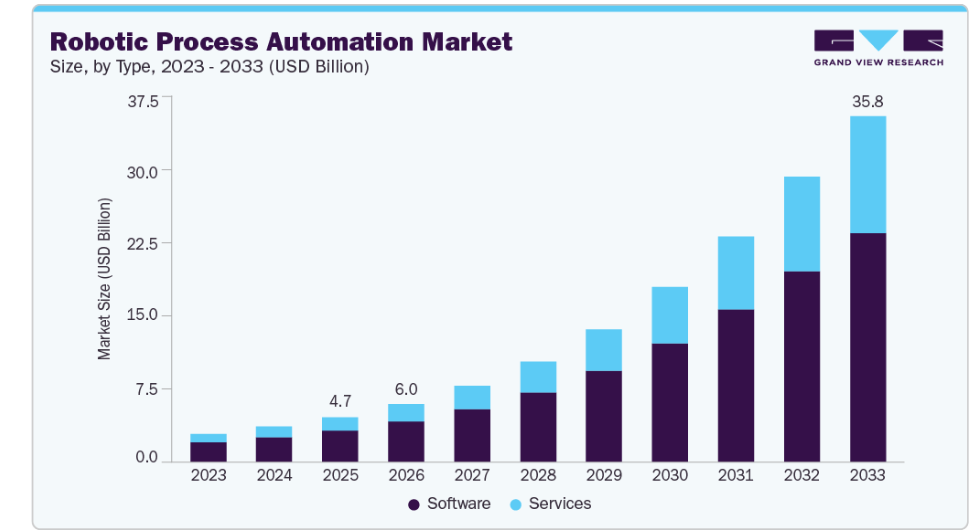
According to Grand View Research, the global robotic process automation market was valued at USD 4.68 billion in 2025 and is projected to reach USD 35.84 billion by 2033, growing at a CAGR of 29.0% from 2026 to 2033.
In this comprehensive guide, we’ll break down everything you need to know, from how robotic process automation software works to real-world use cases, benefits, costs, and how to implement robotic process automation step by step. Whether you're exploring automation for the first time or looking for expert RPA consulting, this guide will help you make informed decisions.
For years, business processes have been manual, time-consuming, and prone to human error. But with the rise of RPA, organizations can now automate routine workflows, freeing teams to focus on strategic and creative work.
Today, evolving models like RPA-as-a-Service, along with low-code and no-code platforms, are making automation more accessible than ever. This means businesses of all sizes can adopt robotic process automation without heavy technical dependencies.
In this guide, we'll explore what RPA is and how industries can take advantage of it.
What Is Robotic Process Automation?
Robotic process automation (RPA) is a software technology that uses bots to automate repetitive, rule-based digital tasks by following business logic and working with structured inputs. Core RPA runs on predefined rules, and AI, machine learning (ML), and natural language processing (NLP) are increasingly layered on top (an approach known as intelligent automation) so that bots can also handle unstructured data such as documents and emails.
In simple terms, it uses software bots that can mimic human actions, interact with digital systems, and execute tasks seamlessly with more precision.
To implement RPA in business processes, software engineers build software robots that emulate human actions of interacting with digital systems like computers. These software bots can understand what is on the screen and how to navigate through the system to perform the desired task.
Assessing RPA and automation skills is crucial for companies looking to hire the right candidates. That's where assessments can be incredibly helpful in assessing technical abilities and identifying areas for improvement. By using assessments companies can feel confident that they're making the best hiring decisions possible.
How Does Robotic Process Automation Work?
RPA lets businesses automate repetitive tasks with minimal disruption. Because bots work through the same user interface a person uses, they can run on existing infrastructure without changes to the underlying systems.
With RPA, there are endless possibilities of what could be automated - from simple copy/paste activities all the way up through complex data extraction methods such as web scraping and downloading files off servers.
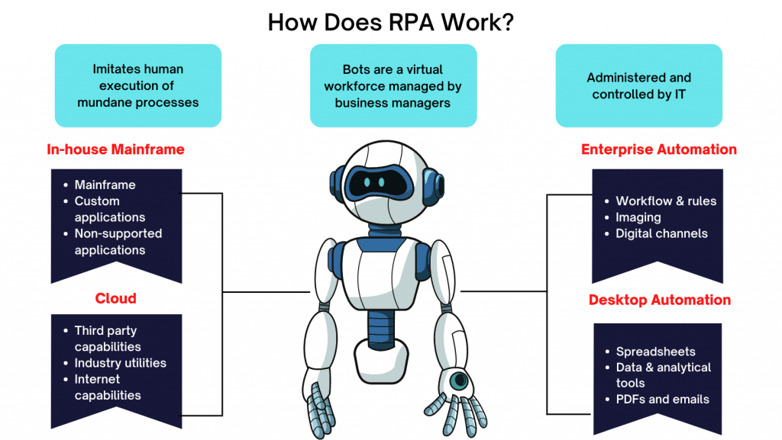
By automating these processes with Robotic Process Automation (RPA), you can create a system where bots interact and complete work assignments just like people do! This will allow minimal disruption while still leveraging existing infrastructure which makes it easy on everyone involved - especially since we know how much RPA improves efficiency.
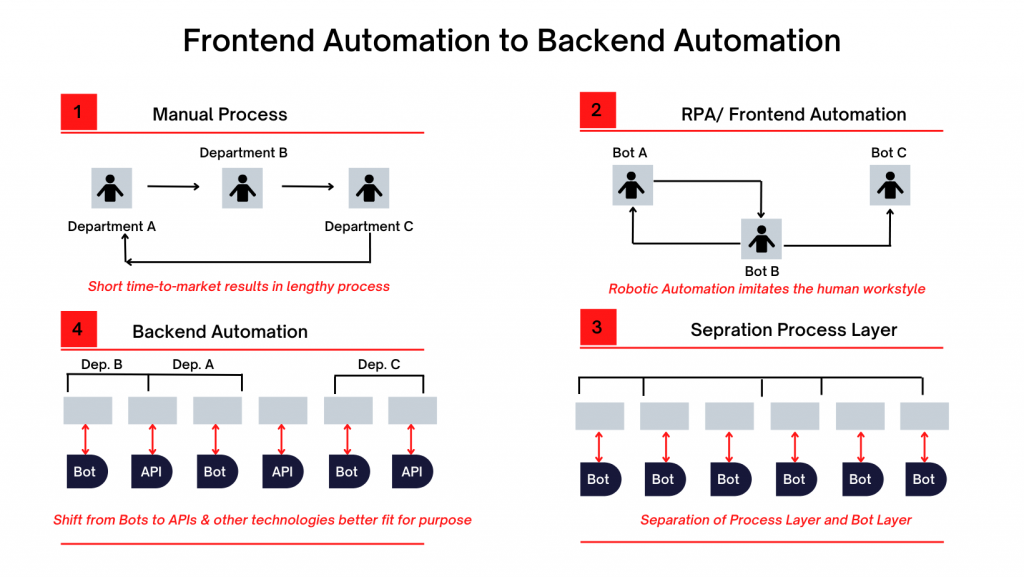
An RPA system works by integrating with your existing technology infrastructure. RPA tools can integrate with your front-end (desktop connections) or back-end (databases and enterprise web services) to perform different tasks.
Depending on your organization’s automation needs, you can integrate RPA with either technology infrastructures or both.
- From the front-end perspective, there are several ways an RPA system can connect with your applications like Salesforce CRM, SAP, PeopleSoft, etc. RPA, at the front-end, can read and write data and record events straight from the target applications’ user interface.
- On the back-end, the RPA accesses systems and services under the governance of the process automation server to facilitate unattended automation (more on attended automation later). For example, software bots can carry out back-office tasks such as processing loan applications without requiring any human intervention when installed in the back-end systems. In many cases, these bots also rely on screen scraping techniques to extract data from legacy systems or applications that do not provide APIs, enabling seamless data capture and processing.
Key Components of an RPA System
Most RPA platforms are built from the same five components:
- Design studio: the development environment where automation workflows are built, usually with a drag-and-drop editor or a recorder.
- Software bots: the digital workers that run the workflow by interacting with application interfaces, files, and databases.
- Orchestrator or control dashboard: the central console that schedules bots, assigns work, manages credentials, and monitors performance.
- Integration layer: the connectors and APIs that link bots to front-end applications, back-end systems, and AI services such as OCR and NLP.
- Exception handling: the rules that send failed or unusual transactions to a human reviewer and log the error for later analysis.
Why Is Robotic Process Automation Important in 2026?
According to Gartner’s 2025 Magic Quadrant for Robotic Process Automation, RPA software generated $3.8 billion in revenue in 2024, an 18% increase year over year and well ahead of the 10.7% growth Gartner reported for the broader infrastructure software market. Gartner also notes that AI agents are becoming essential partners to RPA, enabling organizations to automate more complex and less predictable tasks than scripted bots can handle alone.
This rapid growth is driven by key business challenges:
-
Rising operational costs and the need for efficiency
-
Increased data volumes requiring faster processing
-
Talent shortages and growing employee burnout
-
Demand for faster, error-free customer experiences
Post-pandemic, organizations have significantly accelerated their automation initiatives. Today, enterprises are not just experimenting with automation—they are scaling it across departments with the help of RPA consulting partners to ensure strategic implementation.
Industries such as BFSI, healthcare, retail, and manufacturing are leading adoption due to their high-volume, rule-based processes. At the same time, advancements in AI-powered robotic process automation software are enabling more intelligent, end-to-end automation beyond basic task execution.
In a landscape where speed, accuracy, and scalability define success, robotics process automation has become a critical enabler of digital transformation and long-term business resilience.
RPA implementation can help organizations:
- Free their employees up for higher-value work.
- Provide their employees with a virtual assistant.
- Increase employee inclusiveness in digital transformation.
- Retain valued employees.
Businesses can attain their automation goals depending on the type of RPA bots they implement. Let’s discuss the 3 common types of RPA bots.
Types of RPA Bots:
We’ve already discussed that RPA bots can perform predefined tasks. Depending on their implementation approach and work environment, RPA bots are generally categorized into 3 types.
1. Attended/Assisted Bots
Attended bots can be called virtual assistants that help employees with their tasks. Legacy-attended bots are limited to an employee’s desktop. In current times when RPA is getting more and more intelligent, attended bots are only suited for tasks that need to be triggered at points that are hard to detect by computer programs.
A very popular example of attended bots is in customer service operations. The employees ( customer service representatives) can trigger the bot to pull customer queries while they continue talking to them and understand their requests or grievances.
2. Unattended/Unassisted Bots
Unattended bots enable end-to-end automation that works on its own. These bots are triggered by logic in the automation process flow and have some level of decision-making ability to eliminate the need for human input. Unattended bots are the holy grail of enterprise automation strategies.
For example, the loan request at banking institutions can be taken care of by RPA bots. The software bots can simply look at the credit history and ratings of an individual to decide their eligibility.
3. Hybrid Bots
In a real business scenario, an enterprise-level automation strategy includes a hybrid automation approach where both attended and unattended RPA bots work together to increase overall efficiency and reduce human errors.
Benefits of Implementing Robotic Process Automation
Following are the most desirable benefits of RPA:
1. Reduces Cost by Increasing Productivity
In a conventional operational setup, humans are required to spend a hefty amount of time on repetitive tasks such as document scanning and verification, copying and pasting information, etc. Naturally, this increases the reliance on human labor, which is slow and costly.
The goal behind implementing RPA is to let humans work on things they excel at and let software bots take care of the rest of the tasks. Deloitte’s Global Intelligent Automation Survey found that organizations with 11 or more automations in place achieved an average cost reduction of 32%, which triggers the economies of scale.
Also, robots are faster than human beings because they can work tirelessly 24*7. They can be active even when your entire workforce is asleep.
2. Reduces Manual Errors
Humans are prone to errors. And the chances of mistakes with mundane and repetitive tasks are as high as possible. With the right software bots implemented for the right business processes, you can sit back and relax because the software bots won’t make errors that your employees might.
Make sure that you get the implementation right. Consult an RPA software engineering team and work together to find the appropriate use cases.
3. Improves Employee Experience
Another aspect of RPA is the employee experience. For example, RPA+AI can enhance the work environment at a conventional workplace like a manufacturing facility by eliminating mundane and repetitive tasks, allowing humans to work on jobs requiring decision-making input.
4. Enhances Customer Service
Many companies have a hard time meeting highly varied customer demands. With RPA implemented into several business operations, you can focus more on things that matter, like customer service.
Not only this, the RPA bots can handle the screening and allocation of customer service requests so that they reach the right customer representative every time.
5. Streamline Compliance Management
RPA software’s ability to pull and aggregate data from several sources makes it the perfect tool to streamline compliance management for an organization. In addition, businesses can enhance regulatory reporting efficiency as the RPA systems can reduce the need to spend a lot of time collecting, compiling, and summarizing a huge chunk of information.
One critical aspect is the speed of an RPA system depends on the legacy infrastructure of the enterprise. Therefore, your ERP system's speed, complexity, and accuracy impact the overall automation output. Hence, it’s highly recommended to go with an experienced RPA consultancy.
Related Read: Benefits of RPA Implementation in Business
What Business Processes Can be Automated by RPA?
The use cases of RPA in business processes range from reducing payroll process errors to processing loans and customer onboarding applications. Organizations across the globe have increasingly been adopting robotic process automation (RPA) software programs to make their operations more efficient.
Let’s discuss the business processes in several industry verticals that can be automated by RPA.
1. RPA in BFSI and Insurance
The banking, financial services, and insurance industry is the market leader in RPA adoption, accounting for around 29% of the market in 2025, according to Precedence Research. Banking, finance, and insurance companies tend to deal with a lot of data, and due to this, they require a larger scale of automation.
Some of the popular RPA use cases in the BFSI and insurance domain are:
- Customer onboarding
- Statement processing
- Fraud detection
- Compliance management
- Customer query handling and communication
- Customer claims management
- Underwriting and payouts

2. RPA in Retail
The retail and consumer goods industry continues to adopt RPA at a steady pace. With online overthrowing offline, retailers have understood that higher efficiency is the key to obtaining more customers because higher efficiency results in lesser operational costs, which allows retailers to offer discounts and coupons.
Following are the common use cases of RPA in the retail sector:
- Invoice processing
- Store inventory management
- Product categorization
- Customer support
- Logistics and supply chain management
3. RPA in Manufacturing & Logistics
Core manufacturing is already largely automated, with physical robots in place. For example, the assembly line robots in the automotive industry.
Manufacturers often struggle with the cost pressure of having lower margins and the resource limitation, which restricts their focus on next-gen product innovation. RPA is implemented for these supporting manufacturing functions to make them work more efficiently.
The World Economic Forum’s Global Lighthouse Network reports that its latest cohort of advanced manufacturing sites, which combine automation and AI at scale, achieved an average 40% increase in labour productivity and a 48% reduction in lead time.
RPA can even enable intelligent upstream processes like demand planning, sourcing, and procurement. Also, for the downstream processes, RPA can infuse automation into distribution channels, warehouses, and logistics.
Following are the most promising RPA use cases for manufacturing and logistics:
- Predictive and preventive maintenance
- Shipment scheduling and processing
- Purchase order initiation
- Inventory and raw material management
Many manufacturers are also discovering that pm scheduling becomes significantly more efficient when automated systems can analyze equipment performance data and automatically create maintenance windows based on actual usage patterns rather than fixed calendar schedules.
4. RPA in Healthcare
Healthcare has been the most demanding industry for RPA implementation during and post-pandemic. Healthcare institutions aim to focus more on delivering value-based care and attention to patients, and in order to achieve that, they need to focus less on the back-office tasks. Healthcare and pharmaceuticals are also projected to be the fastest-growing end-use segment for RPA, according to Precedence Research.
Here are the more trending healthcare RPA use cases:
- Compliance management
- Patient appointment scheduling
- Payment processing
- Claims management
- Data entry, migration, and extraction
5. RPA in Telecom
With the ever-increasing demand for seamless connectivity and faster internet, the telecom sector struggles with meeting customer demands while keeping the cost lower. As a result, telecom operators deal with high overhead expenses, risk of errors, and low productivity, requiring immediate attention.
Many telecom operators have already started to automate their processes to gain a competitive advantage. Following are the top use cases of RPA in telecom:
- Compliance management
- Metadata management
- Customer support
- Customer application processing
- Email to ticket automation
6. RPA in Hospitality
Hospitality providers are dealing with rising labor and operating costs while customer expectations keep climbing. We all know that travel costs are going to rise due to an increase in oil prices. Even though the increased process doesn’t demotivate people for travel, the customer expectation from the hospitality service providers will certainly increase due to higher prices. This brings a need for significant savings in operational costs.
Following are the top automation opportunities for hospitality businesses to reduce operational costs:
- Booking automation
- Loyalty benefits processing
- Competitor pricing analysis
- Compliance management and reporting
- Claims processing
- Customer complaints handling
RPA Use Cases by Business Function
Beyond industry-specific workflows, the same RPA use cases recur across most organizations regardless of sector:
- Finance and accounting: accounts payable and receivable, invoice matching, bank reconciliation, and month-end reporting.
- Human resources: payroll processing, employee onboarding and offboarding, timesheet validation, and benefits administration.
- IT operations: password resets, user provisioning, software license audits, and incident ticket routing.
- Customer service: order status updates, ticket categorization and routing, and customer data updates across systems.
How to Implement Robotic Process Automation: A 7-Step RPA Implementation Process
It is evident that RPA is necessary for operational efficiencies and competitive advantage. For every organization that is willing to invest in automation via RPA, the implementation journey remains more or less the same.
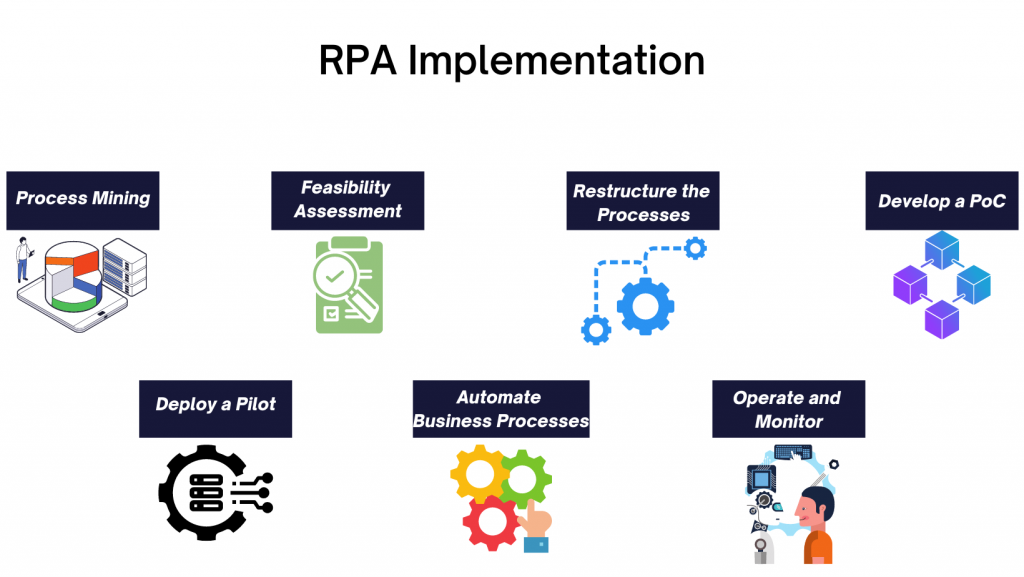
Following are the standards and steps required for a successful RPA implementation:
1. Process Mining
The automation journey in any industry starts with process mining. Because having a thought process around making the business processes efficient is the critical step for any large-scale digital transformation.
Process mining helps RPA enablers to identify business processes that can be automated. Once the process automation is up and running, you can move on to task automation.
Process mining and task mining tools analyze system event logs and user activity to show which processes run most often, take the most time, and follow consistent rules. The strongest automation candidates are high-volume, rule-based processes with structured digital inputs and a low exception rate. This is also the stage to define business goals and baseline metrics, such as average handling time, error rate, and cost per transaction, so that the results of later steps can be measured.
2. Feasibility Assessment
During the feasibility assessment, the process examination and technical feasibility are carried out to evaluate to what extent a process can be automated. Most often, the actual process handler, a subject matter expert, and an RPA expert collaborate to assess the automation feasibility of a business process.
3. Readjust or Restructure the Processes
Depending on the feasibility analysis results, identify the processes that aren’t structured, standardized, recorded, and optimized for automation. You need to restructure these processes to enable automation.
4. Develop a PoC
When the processes are ready to be automated, you should first develop a proof of concept to test the practicality of RPA tools and technologies within their business environment. You should aim for automating the critical elements of business processes, not the entire process, and examine whether the automation efforts drive desired results or not.
Agree on success criteria before the PoC starts, for example, a target reduction in handling time or error rate, so the outcome can be judged against the baseline.
5. Deploy a Pilot
Once you attain success in your PoC, it's time to run the pilot. During this step of RPA implementation, focus on the results. Analyze the bot vs. manual performance and determine whether you’ve invested in the correct type of RPA.
6. Automate Your Business Processes
You need to formulate an implementation plan for RPA and reorganize your teams or resources if needed. Some organizations believe they only need RPA developers for their automation journey, but that is not the case. RPA implementation requires a comprehensive team of business analysts, operating staff, subject matter experts, project managers, developers, and a solution architect.
Organizations that plan to scale beyond a few bots usually set up an RPA Center of Excellence (CoE), a central team that sets development standards, manages bot governance and security, and prevents duplicate or unsupervised bots from spreading across departments.
7. Operate and Monitor
Your RPA journey doesn't end with the deployment. You need to frequently analyze the bot’s performance and ensure that they aren’t overloaded etc. Hence, it’s therefore important to partner with an RPA consultancy like Signity Solutions to ensure a successful automation journey.
Useful KPIs to track include bot success rate, exception rate, average handling time, cost per transaction, and hours of manual work saved. Bots also need maintenance when the applications they operate change, because updates to a user interface are a common cause of bot failures.
How Long Does RPA Implementation Take?
The timeline for RPA implementation depends mainly on process complexity. According to HGS, low-complexity processes with minimal business rules and few system integrations typically take 3 to 4 weeks, medium-complexity processes take up to 6 or 7 weeks, and high-complexity processes that span multiple applications or carry compliance requirements often take 10 to 12 weeks or longer. These ranges apply to a single bot, and a program that includes a pilot and rollout across departments takes longer.
How Are Businesses Leveraging RPA Solutions?
Businesses across several industry verticals are increasingly adopting RPA into their processes. Here are some of the recent RPA deployments worldwide:
AT&T’s Low-Code Automation in 2022
With the need to work from home during the pandemic, AT&T was left with unique challenges. One such case was that payments were made via phone, but the law in the US doesn’t allow businesses to access sensitive customer data such as credit card details.
AT&T implemented a low-code RPA system to curb this issue that can process payments while keeping customer-sensitive information secure. The AT&T case study showcases that solution allowed 40,000 AT&T employees to work from home effectively.
Digital Transformation Journey for the United Commercial Bank Ltd
United Commercial Bank, one of the largest private-sector commercial banks in Bangladesh, has announced a partnership with UiPath to implement RPA to complement their overall digital transformation journey.
Skoda’s Digitalization Strategy
As part of their digitalization strategy, Skoda allowed users to utilize low-code RPA platforms to automate their daily tasks without the need for professional IT help. The low-code architect at Skoda, Jaroslav Štěpán explains that they use a hybrid model where the IT creates guidelines and the citizen developers build their automation within the limits of guidelines.
How Much Does RPA Implementation Cost?
The cost of RPA implementation depends on the number of software bots and components that make up your deployment. Generally, a single bot unit costs somewhere between $5,000 to $15,000. The cost can be broken down into several parts in which nearly 25-30% goes to licensing, and the rest is a combination of the following:
- Infrastructure setup cost.
- Hiring and training for internal subject matter experts.
- RPA vendor or consultant cost.
- Licensing cost to third-party software integration and renewals.
- Monitoring and maintenance of RPA bots.
Top RPA Tools to Consider in 2026
With the modern low-code/no-code approach to automation, many RPA vendors have started to offer cloud-based RPA solutions for businesses. Though these vendors claim that the no-code approach doesn’t require any technical input, we all have seen what is happening with content management systems on an enterprise level.
Gartner’s 2025 Magic Quadrant for Robotic Process Automation, published in June 2025 and covering 13 vendors, named UiPath and Automation Anywhere as Leaders for the seventh consecutive year. The following are seven RPA tools that enterprises frequently evaluate in 2026, and current user ratings are available on Gartner Peer Insights:
1. UiPath
UiPath offers the best RPA tools and systems that are powered by AI and help enterprises automate process mining and the rest of the automation process. The platform also provides a collaboration tool where employees can request processes they want to automate. Gartner named UiPath a Leader in its 2025 Magic Quadrant for Robotic Process Automation for the seventh consecutive year, and the platform now layers generative AI and agentic automation capabilities on top of its RPA core.
With low-code, no-code, and full-code, UiPath can be used by any level of automation experts. Moreover, the platform offers attended, unattended, and hybrid bots to enable comprehensive process automation.
2. Automation Anywhere
The Automation 360 platform offered by Automation Anywhere is a cloud-native RPA solution that is largely used for legacy applications and as an RPA as a service. Automation 360 is renowned for end-to-end automation, which doesn’t require enterprises to treat back-office and front-end processes separately. Gartner also named Automation Anywhere a Leader in its 2025 Magic Quadrant for the seventh consecutive year, and the vendor now positions its platform around agentic process automation, where AI agents handle multi-step processes alongside bots.
3. SS&C Blue Prism (formerly Blue Prism)
Blue Prism is a low-code RPA platform, that allows anyone with the basic-development skills to add automation to their workflows. The platform boasts a drag-and-drop builder, which makes it easy for subject matter experts to customize tasks and infuse automation to them. Blue Prism has AI capabilities, allowing it to mimic and learn human input in business processes. You can implement Blue Prism on-premises, cloud, multi-cloud, and hybrid. Blue Prism was acquired by SS&C Technologies in March 2022 and is now sold as SS&C Blue Prism.
4. TruBot
Provided by Datamatics, TruBot is an RPA software designed to enable a digital workforce of attended and unattended software bots for a wide array of business processes. The software leverages the integration of cognitive applications like machine learning, artificial intelligence, and natural language processing to deliver intelligent automation.
5. OpenRPA
OpenRPA is a very simple, yet striking open-source RPA technology that is free to use and lets users automate virtually any task or process in minutes. It can automate IoT devices and is a great pick for developers.
6. Conversational RPA by AutomationEdge
Targeted to a very niche segment of business processes, AutomationEdge Conversational RPA provides employees and customers with a single-window for several operations and issues.
The software program resolves customer and employee issues and provides instant and personalized resolutions. In addition, AutomationEdge Conversational RPA offers omnichannel support through which users can enable automation by using channels of their choice like Slack, MS Teams, etc.
7. Microsoft Power Automate
Microsoft Power Automate combines cloud flows with desktop RPA in one low-code platform that connects natively with Microsoft 365, Dynamics 365, and Azure services. Its desktop automation is built on technology from Microsoft’s 2020 acquisition of Softomotive. It is a common choice for organizations already standardized on Microsoft, with attended RPA priced at $15 per user per month and unattended automation at $150 per month for its Process package, which places it at the lower end of RPA licensing costs (AIMultiple, 2026).
What Are the Factors to Consider in an RPA Software?
While there are several fantastic options available for automation, you might wonder which one I pick for my organization. Worry not; many other organizations and digital transformation leaders struggle with the same issue.
Therefore, we’re listing the factors you should consider while picking an RPA software.
- Ease of implementation. With RPA vendors offering low-code and no-code options, you need to understand your requirements. Irrespective of your choice, your RPA software shouldn’t require unnecessary efforts for implementation.
- Features. You need to consider several features like process mining, scalability, and screen slicing while selecting the best RPA software for your organization.
- Cost of ownership. While the no-code and low-code RPA software cost less, the full-code RPA software implementation costs can increase. Therefore, depending on your specific use case, you need to decide on the right RPA software.
- Vendor support. Your RPA vendor should provide you with technical and managed support if things go wrong or your developers need help.
- AI and agentic capabilities. Check whether the platform supports intelligent document processing, generative AI, and AI agent orchestration, since most vendors now build these into their RPA roadmaps.
- Security and governance. Look for role-based access, a secure credential vault, audit logs, and centralized bot management, especially if bots will handle sensitive data.
Picking the right RPA software is not a cakewalk. As we’ve seen, the factors depend on your particular use case. Hence, it’s recommended to partner with an RPA consultancy that can guide you through your automation journey and provide technical support whenever needed.
How Can You Failsafe Your RPA Implementation Journey? Common Challenges and Best Practices
Common RPA Implementation Challenges
Many RPA programs stall after the first few bots. EY has estimated that 30% to 50% of initial RPA projects fail, as reported by TechTarget, and Deloitte’s Global Intelligent Automation Survey lists process fragmentation, lack of a clear enterprise strategy, IT readiness, and resistance to change among the top barriers to scaling automation. The most common challenges are:
- Choosing unsuitable processes. Processes that are unstructured, change often, or have many exceptions produce fragile bots, so use the feasibility assessment in step 2 to filter candidates.
- Bots that break when applications change. Interface updates can stop a bot mid-run, so build monitoring and alerts into the operate and monitor stage and run regression tests after application releases.
- Weak governance. Without a Center of Excellence or clear ownership, departments build overlapping bots with inconsistent standards and security.
- Resistance to change. Employees who expect automation to replace their jobs can slow adoption, so involve process owners early and explain how roles will shift toward higher-value work.
- Difficulty scaling beyond the pilot. Scaling needs reusable components, a managed pipeline of automation candidates, and Security and access control. Bots use credentials to reach business systems, so store them in a secure vault with role-based access and full audit logs.
RPA Implementation Best Practices
Several factors cumulate to the success of RPA implementation. Here are some high-level recommendations to failsafe your RPA journey.
- Develop a vision for the success of your RPA project. Then, list the outcomes you want to achieve with the RPA implementation.
- Put brains into process mining by bringing operation teams and RPA architects together for brainstorming.
- Ensure the reliability of your software bots by performing quality and reliability checks.
- Always start small by implementing a software bot for a couple of or a few tasks. Then, analyze their performance before scaling up.
- Partner with the right RPA consultancy to ensure higher ROI and reliability from a technical point of view.
- Set up a Center of Excellence early to standardize development, security, and governance before the number of bots grows.
- Define KPIs and baseline measurements before the pilot so that ROI can be measured against real numbers.
How is RPA Different From Other Automation Solutions?
In principle, both conventional automation solutions and RPA utilize software integration to automate business processes. Still, there are several notable differences between both that make them unique.
- Technological differences: Conventional automation solutions use application programming interfaces (APIs) to bring together several systems, whereas RPA makes use of software bots to learn user actions at the interface level.
- Turnaround time: With capabilities like low-code or no-code development, RPA excels in the battle between traditional automation and RPA. While conventional automation requires complex programming and quality checks, some techno-functional developers can build automation using RPA.
- Customizability: With the subject matter, experts enabled to create bespoke automation, RPA facilitates an advanced level of customization. On the other hand, traditional automation requires changes in the existing IT infrastructure to make changes.
RPA vs. Intelligent Automation vs. Agentic AI
RPA is often compared with intelligent automation and agentic AI, and the three work best in combination. Gartner notes that AI agents are becoming essential partners to RPA, with agents handling complex or unpredictable work and bots executing the repeatable steps inside existing applications.
| Aspect | RPA | Intelligent automation | Agentic AI |
| Core approach | Software bots follow predefined rules and scripts | RPA combined with AI and ML, such as OCR, NLP, and prediction models | Autonomous AI agents interpret a goal, plan steps, and adapt as conditions change |
| Data handled | Structured digital data | Structured and semi-structured data, including documents and emails | Structured and unstructured data, including free-text requests |
| Decision-making | Rule-based if-then logic | Model-assisted decisions inside a defined workflow | Context-based decisions within guardrails set by people |
| Exceptions | Routed to a human | Common exceptions handled by trained models | Agent attempts to resolve the exception and escalates when uncertain |
| Best suited for | High-volume, stable, repetitive tasks | Document-heavy processes that need limited judgment | Complex, variable processes that span several systems |
Traditional RPA remains the more dependable choice for stable, high-volume processes, so most organizations add AI capabilities to their existing bots instead of replacing them.
Why Choose Signity Solutions for RPA Journey?
Choosing the right partner for your automation journey is essential for the success of your RPA implementation. Here are the top reasons you should pick Signity Solutions as your RPA partner.
- End-to-end RPA services: We, at Signity Solutions, offer complete RPA services, including advisory, design, development, licensing, training and workshop, and support.
- Proficiency with RPA: We’ve been deploying RPA solutions for more than six years, making our implementation approach immune to errors.
- Industry expertise: So far, we’ve catered RPA solutions to BFSI, Hospitality, Healthcare, Retail, and Manufacturing.
- Top RPA experts onboard: We have the best RPA resources that can help you plan, design, and implement RPA solutions at every scale.
Future of Robotic Process Automation: RPA Meets AI Agents
RPA is moving from standalone task automation toward broader automation platforms that combine bots with AI agents, intelligent document processing, low-code tools, and integration platforms. Gartner’s 2025 Magic Quadrant describes this shift and predicts that by 2027, 60% of RPA vendors will include ‘computer use’ capabilities that let AI agents operate application interfaces directly. For most enterprises this means RPA remains the reliable execution layer for high-volume processes, while AI agents take on the exceptions and unstructured work around it.
If you’re looking for an RPA service provider to help you through your automation journey, feel free to reach us at sales@signitysolutions.com, and one of our RPA experts will get in touch with you.

Mangesh Gothankar


Ashwani Sharma
Achin Verma
Frequently Asked Questions
Have a question in mind? We are here to answer. If you don’t see your question here, drop us a line at our contact page.
How long does it take to implement robotic process automation?

The timeline for implementing robotic process automation depends on process complexity. Low-complexity processes with few rules and integrations can go live in about 3 to 4 weeks, medium-complexity processes take up to 6 or 7 weeks, and high-complexity processes often take 10 to 12 weeks or longer (HGS). A pilot and enterprise rollout add time on top of the initial build, and working with RPA consulting support helps keep each stage on schedule.
Is robotic process automation suitable for small businesses?
Can robotic process automation work with legacy systems?
How do you measure ROI from RPA implementation?
Will AI agents replace RPA?