

.png?width=27&height=27&name=Group(1).png)

-1.svg)
-1.svg)


-2.svg)


%201-1.webp?width=148&height=74&name=our%20work%20(2)%201-1.webp)




.svg)





Traditional computer vision could see; however, it could not explain what it saw. Though it could flag an assembly line and detect a face in a security feed, it could not actually answer questions about the image and reason about context. Thanks to vision-language models, that could close those gaps. And some numbers will help you believe this. Enterprises are adopting them fast: 68% of large corporations had already started VLM pilots by Q2 2026.
VLMs are AI models that blend the capabilities of computer vision and large language models. They can simultaneously learn from images, text, scanned documents, and more to handle any kind of task from visual question answering to image captioning. This is why vision-language AI is now a core part of modern computer vision solutions, not just a research trend.
This post breaks down what vision-language models are, how multimodal AI models work, and why enterprises continue to adopt them.
What Are Vision Language Models?
Vision language models are AI systems that understand images and text together, not as separate tasks. A standard computer vision system might detect an object and stop there. A VLM can look at the same image, explain what's happening, and answer questions about it in plain language.
They combine computer vision with large language models, which is what sets them apart from traditional vision systems that are typically designed for specific tasks. Instead of relying on separate models or rigid pipelines for different functions, a VLM can process visual and textual information together, reason across multiple inputs, and generate natural language responses. While interacting with a VLM is as simple as using natural language prompts, production deployments still require integrations, APIs, workflows, data governance, and security controls.
This is the core idea behind multimodal AI: a single model that learns from multiple input types and builds a shared understanding across them.
How Vision Language Models Work
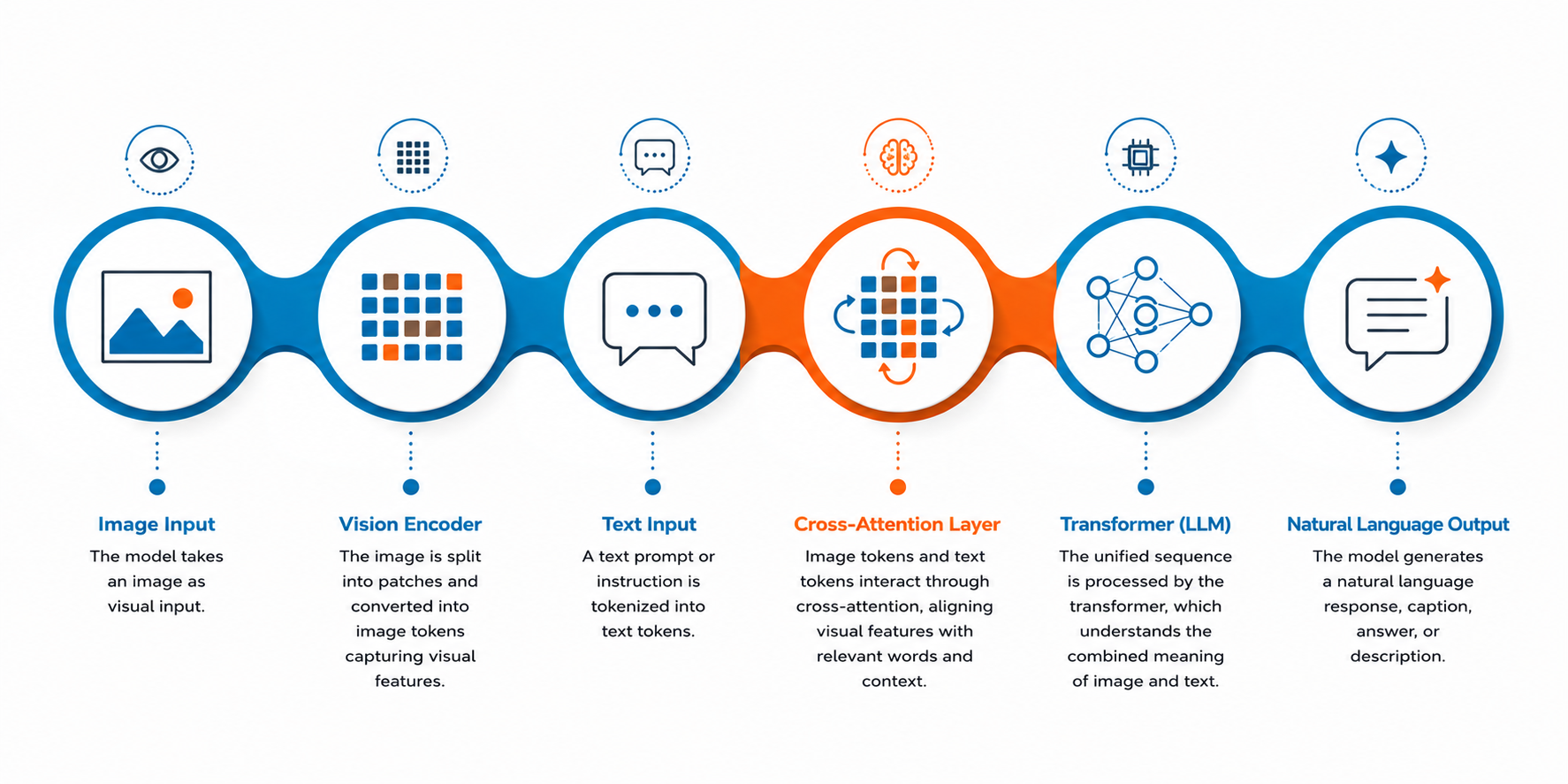
A vision language model is really just a transformer, the same tech behind ChatGPT and others, taught to read pictures as well as words. There are four moving parts. Worth knowing them, because they explain why these models can do things a normal computer vision tool can't.
1. Vision Encoder
First, the image goes through a vision encoder. It chops the picture into chunks, called image tokens, the same way a sentence gets chopped into words before a language model can touch it. Edges, colors, shapes, where things sit relative to each other. All of that gets squeezed into a format the model can actually use.
Then there's the language model itself, handling whatever text came along with the image. A question. An instruction. "What's wrong with this part?" It runs on the same mechanics as any text-only model.
2. Cross-Attention Layer
The clever bit is the cross-attention layers. This is what stops the model from treating the image and the text like two strangers at a party. Ask about a "cracked" surface, and cross-attention is what lets the model weight the image features tied to that word more heavily, connecting "cracked" to the relevant visual patterns rather than leaving it as a word floating in space.
3. Input Sequence
Last, everything gets merged into one input sequence: image tokens and text tokens together. The model isn't looking at the picture, then reading the question. It's doing both at once. That's the whole trick, honestly, and it's why a VLM can answer a specific question instead of spitting out a generic tag like "object detected."
Train that setup on enough image-text pairs, and it starts recognizing things it's never technically seen before. Not perfectly. But well enough to be useful.
The architecture is trained on volumes of image-text pairs. This teaches the model to combine raw visual data with the language you have used to describe it. Over time, with regular inputs, it learns the patterns of what a damaged package looks like. This is enough to generate text or answer a natural language query about a completely new image it's never seen before.
Key Capabilities of Vision Language Models
A VLM earns its keep by collapsing jobs that used to need separate computer vision tools, separate teams, or someone staring at a screen all shift.
1. Visual Question Answering
Ask a plain question about a photo and get a plain answer. No dashboard, no query language. A warehouse manager doesn't need to dig through inspection logs; he just asks how many boxes in this shipment are damaged and gets an accurate response without having to manually perform the counting.
2. Image Captioning
Feed the model a stack of unlabeled digital images, and it can generate text describing each one, turning raw data into something searchable. This is what makes sorting through thousands of untagged photos actually workable.
3. Object Detection and Image Segmentation
Point it at a product shelf, and it identifies and outlines individual items in the frame, the same groundwork as traditional computer vision systems, but paired with reasoning. A standard system flags "car detected." A VLM can go further and describe the scene: where the car sits relative to a curb or sign, its color, whether it looks out of place. Track it across a sequence of frames and the model can also follow its movement over time.
4. Optical Character Recognition
Reading text off receipts, ID cards, or price tags and pulling it into usable data instead of leaving it locked in a static image. Often runs in the same pass as segmentation and detection; no separate model needed per task.
5. Object Tracking
Give it a sequence of video frames, and it follows a person, vehicle, or package across the whole clip. Useful on a factory floor watching assembly lines, or in a parking lot where one snapshot doesn't tell the full story.
What This Means for Business
None of these is new problems for computer vision technology to solve on their own; object detection, facial recognition, and image processing have existed for years. What's new is pairing them with reasoning and natural language.
A quality control line that needed a person reviewing every frame can now run on flagged anomalies with a plain-language note attached. A hospital working through a backlog of medical images gets a second set of eyes that never gets tired, so healthcare professionals see the cases that need attention first. None of it replaces judgment; it just clears the grunt work sitting in front of it.
Vision Language Models vs. Traditional Computer Vision Systems
The easiest way to see what sets VLMs apart is to put them side by side with the computer vision systems most enterprises already run.
| Parameters | Traditional Computer Vision | Vision Language Models |
| Input handling | Processes visual inputs only | Processes visual inputs and natural language together |
| Output | Labels, bounding boxes, numeric scores | Natural language answers, descriptions, reasoning |
| Interaction | Requires custom code or rigid queries | Understands natural language prompts directly |
| Task scope | One model per task (detection, OCR, tracking, etc.) | One model handles multiple tasks at once |
| Context awareness | Limited to what's in a single frame | Can reason across image, text, and prior context |
| Setup for new use cases | Needs retraining on new training data for each task | Adapts to new tasks with prompts, minimal retraining |
| Best suited for | Narrow, repetitive, high-volume detection tasks | Complex tasks needing judgment, explanation, or flexibility |
The short version: traditional computer vision systems are specialists. Fast, reliable, but narrow. A VLM is closer to a generalist that can also explain its reasoning, at the cost of more compute and, in some cases, less precision on a single narrow task than a purpose-built model would deliver.
Recommended Post: How Custom LLMs Can Transform Your Industry?
Why Enterprises Are Adopting Vision Language Models
Well, there are different reasons companies are adopting VLMs, and a few of them are:
It Cuts Down Manual Review
Companies hire people to check the footage all day. If there is a damaged shipment, document scans, or camera footage, it is immediately flagged. A VLM can perform the tasks without human intervention. So what tasks actually need a human being are now streamlined with the VLM.
One Model, Fewer Systems to Babysit
Traditional computer vision meant a model for detection, another for OCR, another for tracking. Three systems, three training pipelines, three things that break separately. A VLM handles several of these at once. Fewer moving parts, fewer 2 am pages.
It Catches Things While They're Still Happening
If you feed a VLM live camera input, it can help flag a problem as soon as it shows up, rather than someone pointing after reviewing the footage. In security or manufacturing, that gap between "happened" and "noticed" is where the real cost sits.
It Doesn't Need a Mountain of Labelled Data First
Traditional systems needed thousands of hand-labelled examples before they were useful for a new task. VLMs, built on top of large language models and trained on broad image-text pairs, already have a working sense of the world. Point one at a new problem, and it's often useful on day one, not after three months of labelling.
Non-Engineers Can Actually Use It
This one gets underrated. A warehouse supervisor isn't going to write a query against a computer vision pipeline. But he'll type a question. That's often the real reason a tool survives past the pilot, not the accuracy numbers in the slide deck.
Enterprise Use Cases Across Industries
Theory is one thing. Here's where vision language models are actually showing up on the job.
Manufacturing: Visual Inspection and Quality Control
VLM does not tag a product as a failure simply. Rather, on an assembly line, it reviews the parts in real time and flags if there are any abnormalities or defects. The QA team gets notified with a plain-language note for every defective item. It cuts down the time you spend figuring out what numeric code actually means.
Healthcare: Reading Medical Images
The radiology department sits on backlogs. And here VLM scans the medical images and flags the abnormalities. It basically acts as a second set of eyes for the healthcare professionals and doesn’t get tired no matter how long the shift is. It does not replace a diagnosis, but definitely helps prioritise which scan should be looked at next.
Retail: Shelf Monitoring and Product Data
So the retailers don’t have to worry about inventory management at all. You simply point a camera at the shelf, and the VLM instantly tells what is out of stock, what is in demand, what's misplaced, and also read the price tags via optical character recognition. It does not require separate models to perform tasks.
Security: Facial Recognition and Anomaly Detection
Facial recognition does confirm the identity, as it matches the face and returns the name. However, it does not explain what is happening in the scene. A VLM helps and tells if someone lingered near a restricted entrance, instead of digging through hours of footage later. Now this distinction becomes critical when the security team needs context, not just a match.
Logistics: Object Tracking Across Facilities
Packages, pallets, vehicles, all moving through a warehouse at once. A VLM follows them across a sequence of video frames and flags anything that stalls, goes missing, or ends up somewhere it shouldn't. No separate tracking system bolted on; the same model handles it.
Document Processing: Turning Scans Into Usable Data
Invoices, ID cards, forms, sitting as static scanned images nobody can search. Pair OCR with language understanding, and that scan becomes structured data someone can actually pull up, query, or act on, instead of a file buried in a folder.
Challenges & Considerations
VLMs, like most multimodal AI models, aren't a plug-and-play fix. A few trade-offs are worth knowing before rolling one out.
| Challenge | Why It Matters |
| Data quality | Model accuracy depends on high-quality data. Inconsistent training data leads to unreliable outputs, even if the architecture is good. |
| Compute cost | Running a vision encoder alongside an LLM takes real infrastructure. Costs add up fast at scale, especially for real-time use cases. |
| Accuracy in complex environments | Cluttered scenes, poor lighting, or unusual angles can still trip up predictions. Complex environments remain harder than controlled ones. |
| Data privacy | Medical images and facial recognition data are sensitive by nature. Handling them requires strict controls, especially across regions with different regulations. |
| Choosing the right training strategy | Fine-tuning on a business’s data beats using a general-purpose model. However, it takes the right expertise and training strategies to make it right. |
None of these rules out adoption. They just mean a VLM rollout needs planning, not a quick swap-in for an existing computer vision system.
The Future of Vision Language and Multimodal AI Models
VLMs are still early. Where they're headed next matters for how enterprises plan.
Generative AI and VLMs Are Converging
The line between generative AI and vision-language AI is thinning fast. Models that used to just describe an image are starting to generate one, edit one, or create new visual content from a prompt. Expect fewer separate tools for "understanding" and "creating," and more single systems that do both.
Reasoning Is Getting Better, and Agentic Use Cases Are Following
Early VLMs could describe a scene. But the latest ones can easily reason through it and act on what they watch. That opens the door to agentic use cases: a model that flags the defects and decides what next has to be done. It also routes a report, triggers alerts, updates the system and more without human intervention.
Where Enterprise Adoption Goes Next
Right now most enterprises are still in pilot mode, running VLMs alongside existing computer vision systems rather than replacing them outright. That's likely to shift. As reasoning capabilities improve and costs come down, expect VLMs to move from a bolt-on tool to the default layer most computer vision solutions are built on, less "add AI to this," more "this is just how the system works."
Conclusion
Vision language models are changing what computer vision solutions can actually do at work. Instead of just detecting objects or flagging anomalies, they explain, reason, and respond to natural-language prompts, turning raw visual data into decisions that teams can act on immediately. That's why adoption is moving fast, and why most enterprises testing vision-language AI today won't be running it as a side project a year from now. It'll just be part of how the system works.
If your team is exploring where vision-language AI fits into your operations, Signity Solutions can help you build and integrate it the right way.

Mangesh Gothankar


Ashwani Sharma
Achin Verma
FAQs
Do vision-language models need a lot of technical setup to use?
Not as much as older computer vision tools. Since a VLM understands natural language prompts, most teams can start getting value by asking questions in plain English rather than writing custom queries or code for each task.
Can a vision language model work with video, not just still images?
Yes. Many VLMs process video frames directly, which is what allows features like object tracking and real-time anomaly flagging across a live feed instead of a single photo.
How accurate are vision language models compared to specialized computer vision systems?
It depends on the task. A purpose-built model trained on one narrow job can sometimes edge out a VLM on raw precision. But a VLM makes up for it with flexibility, handling multiple complex tasks without needing a separate system for each.
Is switching to a vision language model expensive for a business already using computer vision tools?
It varies by scale and use case. Many enterprises start by layering a VLM onto existing computer vision systems rather than replacing them, which keeps initial costs and disruption lower while testing where it adds the most value.