












Custom manufacturing software development is the design and build of software tailored to a manufacturer's specific production, quality, and supply chain processes. It connects machines, operators, and back-office teams into a single, reliable flow of data. 84 percent of manufacturers already generate measurable value from AI, says Deloitte.
Industry 4.0 implementation is pushing many manufacturers beyond off-the-shelf ERP (Enterprise Resource Planning) systems for manufacturing. Yet generic products rarely fit mixed-model lines, sensor data, or plant-specific rules, which is why many teams turn to custom AI development.
This article explains the top automation use cases, how to plan costs, how to evaluate vendors, which implementation challenges to expect, and what real-world results look like.
Understanding Custom Manufacturing Software Development in Modern Operations
Before comparing vendors or budgets, it helps to be clear about what a custom platform includes and how it differs from packaged tools.
1. Custom Software Versus Standard Enterprise Manufacturing Software
Custom manufacturing software is built around your processes, while standard enterprise manufacturing software expects your processes to fit the product. Three building blocks show up in almost every custom project.
An MES (Manufacturing Execution System) tracks how raw materials become finished goods on the floor, in real time. Shop floor data collection captures machine states, cycle times, and operator inputs as they happen, and a work order management system creates, assigns, and closes production jobs.
For example, an automotive supplier running mixed-model lines needs routing logic that changes with every vehicle variant. A fixed MES template rarely supports this without costly workarounds.
2. Process Digitalization Versus Legacy System Modernization
Manufacturing process digitalization turns paper travelers, spreadsheets, and tribal knowledge into structured digital workflows. Legacy system modernization, by contrast, upgrades or replaces software that already exists but no longer keeps pace.
Scalable manufacturing platforms outperform rigid off-the-shelf tools because new lines, plants, or product families are added as modules rather than full reimplementations. For instance, an aerospace parts maker that digitizes inspection records at one site can extend the same platform to a second facility without buying a separate system.
Most custom platforms are built from a common set of capability layers:
- ERP integration - Syncs orders, inventory, and costing data between the shop floor and back-office finance systems.
- IoT-enabled manufacturing - Connects sensors, PLCs, and machines so equipment data flows automatically into the platform.
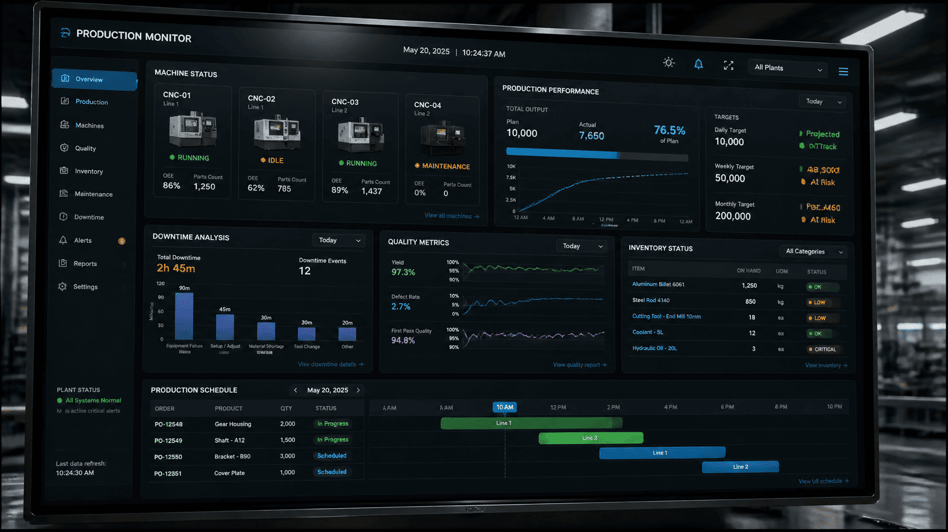
- Real-time production monitoring - Displays throughput, scrap, and line status on live dashboards for supervisors and managers.
- API integration - Links the platform to suppliers, logistics partners, and third-party analytics tools through stable interfaces.
- Operator interface design - Gives floor staff simple, task-focused screens that reduce training time and data entry errors.
Key Automation Use Cases for Manufacturing Software Development
Automation delivers the fastest returns when it targets decisions that are repetitive, time-sensitive, and data-heavy. The four use cases below consistently rank highest for manufacturers.
1. Production Scheduling Automation and Demand Forecasting
Production scheduling automation replaces manual planning boards with algorithms that balance capacity, materials, and due dates. Demand forecasting tools feed that schedule with predictions based on order history, seasonality, and customer signals.
The business outcome is fewer rush changeovers and less idle capacity. A packaging plant, for example, can re-sequence jobs automatically when a large order arrives instead of waiting for a planner to rebuild the week.
2. Quality Control Automation With Machine Learning
Quality control automation uses cameras and machine learning for manufacturing to spot defects faster and more consistently than manual inspection. Models learn what good parts look like and flag deviations in surface finish, dimensions, or assembly.
This reduces scrap, rework, and customer returns. An electronics assembler can inspect every circuit board on the line rather than sampling a small batch per shift.
3. Predictive Maintenance Systems
Predictive maintenance systems analyze vibration, temperature, and power data from IoT-enabled manufacturing equipment to predict failures before they happen. Maintenance shifts from fixed calendars to actual machine condition, which supports practical downtime reduction strategies.
For example, a sensor on a stamping press detects rising bearing temperature on Tuesday, and the platform schedules a repair during Friday's planned stop instead of losing a full shift to an unplanned breakdown.
4. Supply Chain Integration and Inventory Management
Supply chain integration connects your platform to supplier portals and logistics systems for real-time visibility. Inventory management software then tracks stock levels, lead times, and reorder points automatically.
A food manufacturer can see an inbound ingredient delay early and adjust batch plans before the line stops. If you are planning a rollout, our guide to AI automation implementation explains how to sequence these projects.
Across these use cases, automation typically produces the following outputs:
- Optimized schedules - Daily and weekly production plans that adjust automatically to new orders and capacity changes.
- Defect alerts - Real-time flags that stop or divert faulty parts before they move downstream.
- Maintenance work orders - Automatically generated repair tasks based on predicted equipment condition.
- Reorder triggers - Purchase requests created when inventory falls below dynamic safety levels.
- Demand forecasts - Rolling predictions that guide procurement and staffing decisions.
- Performance reports - Manufacturing data analytics dashboards covering yield, OEE (Overall Equipment Effectiveness), and cost per unit.
Cost Manufacturing Software Solutions: Budget Planning & ROI
Budget clarity is often the deciding factor in whether a project moves forward. Understanding what drives cost, and how to stage spending, makes approval far easier.
1. Main Drivers of Manufacturing Software Implementation Cost
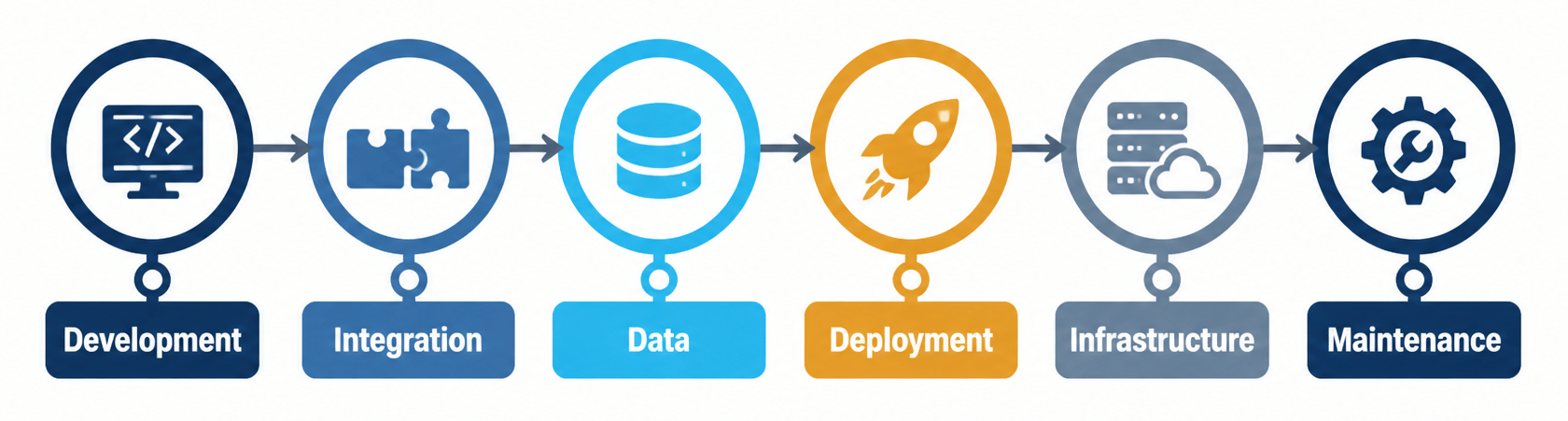
Manufacturing software implementation cost depends less on lines of code and more on integrations, data readiness, and scope. Total cost of ownership manufacturing calculations should include licensing, hosting, support, and internal staff time, not just the initial build.
Build-vs-buy is the first trade-off. Buying is faster for standard functions, while building pays off where your processes create competitive advantage. Cloud-based manufacturing platform pricing usually follows subscription or usage models, which lowers upfront spend but requires ongoing monitoring.
| Cost Driver | Typical Impact on Budget |
| Number of system integrations | High, each ERP, MES, or IoT link adds design and testing effort |
| Data quality and migration | Medium to high, depending on how clean legacy records are |
| Custom AI or ML features | Medium to high, driven by model training and validation |
| Deployment model (cloud vs on-premise) | Medium, shifts cost between upfront and recurring spend |
| Compliance and security requirements | Medium, higher in regulated sectors |
| User training and change management | Low to medium, but often underestimated |
2. Phased Budget Planning From Pilot to Production
A phased approach limits risk by funding proof before scale. Start with a pilot on one line or one process, measure results, then expand to full production deployment.
Track unit costs, not just totals. Deloitte's State of AI in the Enterprise report found that 71% of surveyed leaders track total AI inference and API spend, but only 44% track per-unit inference cost.
Related Read: AI infrastructure cost optimization
3. Calculating Custom Software ROI
Custom software ROI compares measurable savings and gains against total cost of ownership over a defined period. Count labor hours recovered, scrap avoided, downtime prevented, and inventory carrying cost reduced.
Well-scoped automation offers potential cost savings of up to 70%. In one Signity RPA project for a telecom accounting team, the client saved 750+ man-hours per month and automated more than half of accounting processes.
Manufacturing Software Vendor Evaluation: Selection Framework
The right partner shapes cost, timeline, and long-term flexibility more than any single feature. A structured manufacturing software vendor evaluation keeps the decision objective.
1. Define Must-Have Technical Requirements
Start with requirements before you speak to vendors. List the systems that must connect, such as ERP, MES, and PLCs, and confirm that API integration manufacturing standards like OPC UA (Open Platform Communications Unified Architecture) or REST are supported.
Add regulatory compliance software needs, preferred cloud deployment model, and security standards. This list becomes the filter that removes unsuitable vendors early.
2. Build a Structured Software Vendor Comparison
A scoring framework turns opinions into comparable numbers. Weight each criterion by business priority, then score every vendor against the same scale.
Rank your vendor selection criteria in this order:
- Manufacturing domain expertise - Proven experience with production workflows, shop floor systems, and plant-level constraints.
- Integration capability - Demonstrated success connecting ERP, MES, IoT devices, and supplier systems.
- Compliance track record - Experience delivering solutions that meet industry and data protection regulations.
- Scalability - Architecture that supports new lines, sites, and data volumes without rebuilding.
- Support model - Clear SLAs (Service Level Agreements), response times, and post-launch maintenance terms.
- Data ownership - Open formats and full export rights so your data stays portable.
- Delivery approach - Phased roadmaps with pilots, measurable milestones, and transparent reporting.
3. Red Flags to Avoid During Evaluation
Some warning signs predict trouble regardless of price. Vague SLAs, no manufacturing-specific references, and locked or proprietary data formats should all lower a vendor's score.
Be cautious of fixed quotes issued before discovery. A credible partner asks about your data, equipment, and processes before committing to numbers.
Related Read: Choosing Enterprise AI Agent Deployment Consultants
Implementation Challenges and How to Navigate Them
Even well-planned projects face friction. Knowing the common obstacles in advance makes them far easier to manage.
1. Legacy System Modernization Friction
Legacy systems hold critical data but resist change. Replacing them all at once creates downtime risk and user frustration.
The mitigation is phased API integration manufacturing. Wrap legacy systems with APIs, move one function at a time to the new platform, and retire old components only after the new ones prove stable.
2. Operator Interface Design and Change Management
Shop floor data collection fails when operators find the tools slow or confusing. Poor operator interface design leads to skipped entries and unreliable data.
Involve operators early in design sessions and test screens on the actual floor. Simple, large-button interfaces and short training sessions raise adoption quickly.
3. Data Quality and Batch Processing Limits
Manufacturing data analytics is only as good as its inputs. Older batch processing software updates data hours after events occur, which undermines real-time decisions.
Audit data sources before building models, standardize naming and units, and move high-priority feeds to streaming where it matters most.
These best practices keep implementations on track:
- Start small - Pilot on one line to prove value before committing full budget.
- Assign ownership - Name a business owner and a technical lead for every workstream.
- Clean data first - Fix duplicates, gaps, and inconsistent units before automation goes live.
- Train continuously - Offer refresher sessions as features expand across shifts and sites.
- Measure from day one - Set baseline KPIs so improvements are visible and defensible.
Real-World Results: Manufacturing Software Impact Across Industries
Results matter more than feature lists. Two Signity projects show how process automation translates into measurable operational gains that apply directly to manufacturing environments.
In the Telecloud RPA project for telecom accounting, automation took over repetitive financial workflows. The client saved 750+ man-hours per month, automated more than half of accounting processes, and created prompt, precise, and error-free functions. Manufacturers face the same kind of repetitive back-office work in order processing, invoicing, and inventory reconciliation.
The AI-Powered Real Estate Intelligence Platform offers a cross-industry analogy for workflow digitalization. By replacing manual coordination with intelligent automation, administrative workload decreased 50%, freeing 20+ hours weekly for higher-value work.
The lesson for manufacturers is straightforward. When routine data handling is automated, skilled staff spend more time on planning, quality, and continuous improvement, and those hours compound into faster output and lower cost per unit.
Conclusion
Custom manufacturing software development is not just a technology upgrade. It is a strategic shift in how plants plan, produce, and compete.
Signity brings 16+ years of tech success and 200+ certified experts to help manufacturers move from pilot to production with confidence. And we know, the strongest returns come from targeted automation in scheduling, quality, maintenance, and supply chain visibility.
Rigorous vendor selection protects that investment, while phased implementation keeps risk and cost under control. All in all, manufacturers who invest in purpose-built, AI-ready platforms today will set the pace for an Industry 4.0 future defined by real-time decisions and smarter operations.
Frequently Asked Questions
Have a question in mind? We are here to answer. If you don’t see your question here, drop us a line at our contact page.
How much does custom manufacturing software development cost?

How long does implementation typically take?
How should we evaluate manufacturing software vendors?
Are cloud-based manufacturing platforms suitable for regulated industries?